

This blog explains what an omnichannel contact center is, how it differs from the fragmented multichannel setups most companies run today, and how to deploy one effectively. You'll learn the components, benefits, implementation steps, and how to choose the right platform without vendor lock-in.
Key Takeaways
- An omnichannel contact center unifies voice, email, chat, SMS, and social media into one platform where customer context follows every conversation
- Agents see full history regardless of channel, eliminating repeated questions and reducing handle time
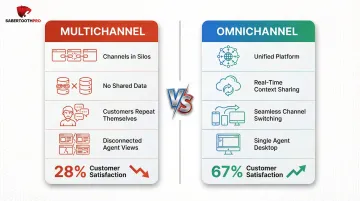
- Customer satisfaction hits 67% with omnichannel support versus just 28% with siloed multichannel
- Implementation follows five steps: audit current channels, define strategy, select CCaaS platform, integrate data sources, and train agents
- SabertoothPro's vendor-agnostic approach, backed by 300+ CCaaS provider relationships, matches businesses to the right platform without bias
What Is an Omnichannel Contact Center?
An omnichannel contact center is a unified customer service infrastructure connecting every communication channel—phone, email, live chat, SMS, social media, and self-service portals—into one platform where customer context travels seamlessly across channels. When a customer switches from chat to phone, the agent already sees the full chat transcript.
The core distinction from multichannel is simple but critical. Here's how the two approaches differ:
- Multichannel: Channels run in parallel but operate in silos. A customer who emails and then calls gets treated as two separate interactions.
- Omnichannel: All channels share real-time data and history. The customer never repeats themselves, regardless of how many touchpoints they use.
The "omni" in omnichannel means the journey is continuous and context-aware. An agent picking up an SMS thread already knows the customer's account status, open tickets, and last interaction—without asking the customer to start over.
Most modern omnichannel contact centers are delivered as Contact Center as a Service (CCaaS)—cloud-based platforms that eliminate on-premise hardware investment and enable rapid scalability. The global CCaaS market is projected to grow from $8.33 billion in 2026 to $30.15 billion by 2034, driven by small and mid-sized enterprises adopting cloud solutions.
Key Channels and Core Components of an Omnichannel Contact Center
Primary Communication Channels
A complete omnichannel stack includes:
- Inbound/outbound voice calls — still essential for complex issues requiring real-time resolution
- Email — asynchronous communication for detailed inquiries and documentation
- Live web chat — the #1 preferred support channel at 41%, offering immediacy and convenience
- SMS/text messaging — popular for notifications, confirmations, and quick questions
- Social media messaging — Facebook, Instagram, Twitter/X for customer engagement where they already spend time
- Self-service portals and chatbots — handle Tier-1 queries automatically, deflecting up to 40% of cases to more cost-efficient channels
Phone remains critical, but 70% of consumers who use it say they prefer other channels. The key is offering all channels while unifying them.
Unified Agent Desktop
The unified agent desktop—often called a single pane of glass—is the interface where agents see all channel interactions, customer history, and CRM data in one place. No toggling between separate tools. When a contact arrives, the agent sees:
- Full conversation history across all channels
- Customer profile and purchase history
- Previous support tickets and resolutions
- Real-time status and intent data
This eliminates the problem plaguing siloed systems: 58% of agents at underperforming organizations toggle between multiple screens to find information.
CRM Integration
That unified view only works when the contact center connects to the underlying customer record. Integrating your CRM (Salesforce, HubSpot, Zendesk) ensures customer profiles surface automatically the moment a contact arrives on any channel. A Forrester study found that unified CRM workflows removed 2 minutes per call by eliminating manual post-call administration.
AI and Automation Components
AI transforms routing and resolution efficiency:
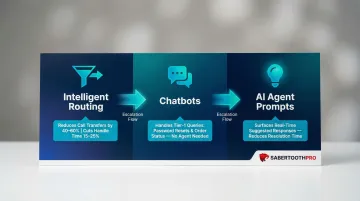
- Intelligent routing (ACD/IVR with AI) — matches customers to the right agent based on intent and history, reducing call transfers by 40-60% and cutting average handle time by 15-25%
- Chatbots — handle Tier-1 queries like password resets and order status checks without agent involvement
- AI-assisted agent prompts — surface suggested responses in real time, reducing resolution time
By 2027, AI is expected to resolve 50% of service cases — which makes understanding your analytics layer critical for knowing when automation is working and when human escalation is needed.
Analytics and Reporting Layer
Unified dashboards provide real-time and historical reporting across all channels in one view. Key metrics include:
- First contact resolution (FCR) — target 60-70%; the clearest signal of omnichannel effectiveness
- Average handle time (AHT) — total time per interaction including hold and wrap-up
- CSAT scores — customer satisfaction ratings tied to specific interactions
- Channel containment rate — how often self-service resolves issues without agent escalation
- Cross-channel abandonment — drop-off rate when customers switch between channels
Key Benefits of an Omnichannel Contact Center
Customer Experience Gains
Customers get consistent, context-aware service regardless of channel. No friction, no repeat contacts, no frustration. Customer satisfaction reaches 67% with smooth omnichannel support compared to just 28% with disconnected multichannel.
First-contact resolution increases retention by 67%, and 60% of customers say it feels like they're communicating with separate departments in siloed multichannel setups. Omnichannel eliminates that disconnect.
Agent Efficiency
With full customer history and AI-assisted routing, agents spend less time searching for context. Companies using integrated omnichannel solutions experience a 31% reduction in first-resolution times and a 39% decrease in customer wait times compared to siloed systems. Agents resolve more interactions per shift as a result.
Better tooling also affects retention. Contact center turnover costs $10,000 to $20,000+ per replacement — and agents who have unified context and smarter workflows are less likely to burn out and leave.
Business Intelligence
Unified reporting gives managers a complete picture across every channel and shift. That visibility translates into decisions that would be impossible with siloed data:
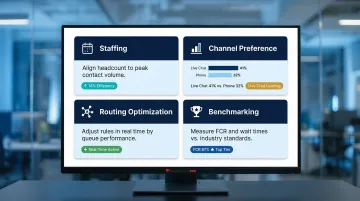
- Staffing: Align headcount to actual contact volume and peak patterns
- Channel investment: Identify where customers prefer to engage — live chat (41%) now outpaces phone (32%)
- Routing optimization: Adjust rules in real time based on queue performance
- Benchmarking: Measure resolution rates and wait times against industry standards
How to Use an Omnichannel Contact Center: A Step-by-Step Approach
Step 1: Audit Your Current Channel Landscape
Before deploying, map every channel customers currently use to reach your business. Identify where conversations break down or context is lost. Document which teams or tools handle each channel today. Common gaps include:
- Email managed separately from phone support
- Chat handled by a different team than social media
- No shared CRM across channels
- Agents unable to see previous interactions
This audit reveals the data silos you need to eliminate.
Step 2: Define Your Channel Strategy and Customer Journey
Decide which channels are essential for your customer base. A healthcare practice may prioritize phone and secure messaging; a retailer may prioritize chat and SMS. Map key customer journeys to understand how contacts should flow between channels. For example:
- Customer browses website → initiates chat → escalates to phone if complex
- Customer emails complaint → agent responds → customer replies via SMS
Understanding these flows ensures your routing rules match real customer behavior.
Step 3: Select and Deploy the Right CCaaS Platform
Evaluate cloud-based contact center platforms that:
- Natively support your required channels (voice, email, chat, SMS, social)
- Integrate with your existing CRM (Salesforce, HubSpot, Zendesk)
- Offer compliance certifications relevant to your industry (HIPAA for healthcare, PCI-DSS for finance, SOC 2 Type II)
- Provide uptime SLAs of 99.99% or higher
A vendor-agnostic partner like SabertoothPro gives you access to 300+ technology providers and matches you to the right platform based on your actual requirements — not what a single vendor happens to sell.
Implementation timelines vary by vendor:
| CCaaS Vendor | Mid-Market Deployment | Enterprise Deployment |
|---|---|---|
| Talkdesk | 2-3 weeks | 4-6 weeks |
| Five9 | 3-4 weeks | 6-8 weeks |
| Genesys Cloud CX | 4-6 weeks | 8-12 weeks |
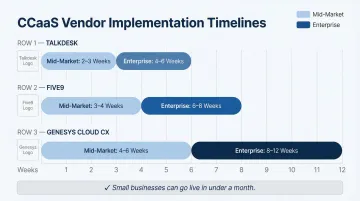
Small businesses can go live in under a month using pre-built integrations and low-code configurations.
Step 4: Integrate Data Sources and Configure Routing
Connect your CRM, ticketing system, and existing communication tools to the new platform. Build routing rules that use customer data—account tier, previous issue type, agent skill set—to direct contacts to the most qualified agent. Configure IVR and chatbot flows to handle common Tier-1 inquiries automatically, deflecting up to 40% of cases to self-service.
Test routing logic extensively before go-live. Traditional IVR systems send 20-30% of callers to the wrong agent; AI-driven routing cuts that misdirection rate significantly by matching callers to skills rather than menu options.
Step 5: Train Agents and Continuously Optimize
Run hands-on training focused on the unified desktop and channel-switching scenarios. Agents used to single-channel workflows often resist change — showing them concrete wins, like no longer asking customers to repeat themselves, accelerates adoption.
Establish KPI baselines per channel:
- First contact resolution (FCR): 60-70% target
- Average handle time (AHT): Measure pre- and post-implementation
- CSAT: Track by channel to identify weak points
- Self-service containment: Monitor chatbot deflection rates
Schedule quarterly reviews of routing performance, containment rates, and agent utilization. The platforms that deliver the best ROI are the ones teams actively tune — not the ones left on default settings after launch.
Common Challenges and How to Overcome Them
Data Silos and Legacy System Integration
Many organizations struggle to unify data from older phone systems, standalone email platforms, and separate CRMs. This causes the 58% of agents who toggle between multiple screens problem.
The fix starts with CCaaS platforms that offer pre-built CRM integrations and API-first architecture. From there, phase the migration rather than doing a hard cutover:
- Integrate one or two channels first
- Validate data flow before expanding
- Resolve integration issues at each stage before activating the next
Inconsistent Customer Experience Across Channels
Agents on different channels may apply different policies or have different information, leading to contradictory answers. One agent says a refund takes 5 days; another says 10 days.
The most effective approach is a centralized knowledge base accessible directly from the unified agent desktop. Combined with regular QA monitoring, this keeps scripts and escalation paths consistent across every channel. AI-assisted prompts add another layer — surfacing standardized responses so agents aren't working from different playbooks depending on how a customer reached them.
Change Management and Agent Adoption
Agents accustomed to single-channel workflows may resist adopting new tools or handling blended queues. Contact centers experience 30-45% annual turnover, partly driven by frustration with disconnected systems.
Overcoming resistance requires more than a training session. A phased rollout gives agents time to adjust before all channels go live — and making the benefits concrete helps accelerate buy-in:
- Fewer repetitive questions from customers who've already explained themselves
- Better tools that reduce screen-switching and context gaps
- Faster resolutions that improve agent satisfaction scores

Celebrate early wins, gather feedback, and refine workflows in real time. Adoption issues left unaddressed tend to show up in attrition numbers later.
How to Choose the Right Omnichannel Contact Center Solution
Identify Must-Have Criteria
Your evaluation should prioritize:
- Cloud-native delivery (CCaaS) — scalability without on-premise hardware
- Native support for your required channels — voice, email, chat, SMS, social media
- CRM and helpdesk integrations — pre-built connectors for Salesforce, HubSpot, Zendesk
- Compliance certifications — HIPAA for healthcare, PCI-DSS for finance, SOC 2 Type II for security
- Uptime SLAs — backed by financial credits if vendor misses targets
Avoid platforms that require heavy professional services just to add a new channel. Flexibility and ease of configuration matter.
Uptime SLAs by vendor:
| CCaaS Vendor | Published Uptime SLA | SLA Credit Thresholds |
|---|---|---|
| Five9 | 99.999% | Credits begin below 99.990% |
| RingCentral | 99.999% | Credits begin below 99.998% |
| NICE CXone | 99.99% | Credits begin below 99.99% |
Evaluate Single-Vendor vs. Multi-Vendor Approaches
A single CCaaS platform covering all channels reduces integration complexity and provides unified reporting. Multi-vendor setups often create gaps in data continuity. For most SMBs and mid-market businesses, a single cloud platform is the lower-risk path.
Work with a Vendor-Agnostic Partner
Rather than being sold one vendor's solution, businesses benefit from working with an advisor who can benchmark real-world pricing and match requirements to the right platform across a broad ecosystem. SabertoothPro works this way — drawing on 300+ provider relationships to compare real-world pricing, match platform capabilities to actual requirements, and avoid steering clients toward any single vendor. The result is a recommendation based on fit, not a preferred contract.
Frequently Asked Questions
What is the difference between omnichannel and multichannel contact centers?
Multichannel means offering multiple channels in silos with no shared data. Omnichannel means all channels share customer context in real time, so conversations flow seamlessly across them without customers repeating themselves.
What channels does an omnichannel contact center typically support?
The main channels are voice (inbound/outbound), email, live chat, SMS, social media messaging, and self-service/chatbot. The right mix depends on where your customers actually engage: retailers prioritize chat and SMS, healthcare prioritizes phone and secure messaging.
How long does it take to implement an omnichannel contact center?
A cloud-based (CCaaS) deployment goes live in 2-3 weeks for basic setups. A full implementation with CRM integrations, custom routing, and agent training typically takes 1-3 months depending on complexity and vendor.
Can small and mid-sized businesses use omnichannel contact centers?
Yes. Modern CCaaS platforms carry no minimum seat counts, so there's no barrier to entry. Vendors like Five9 and Talkdesk offer packages that let small businesses scale seats as needed and deploy in days.
What is CCaaS and how does it relate to omnichannel?
CCaaS (Contact Center as a Service) is the cloud delivery model for contact center software. Most modern omnichannel contact centers are delivered as CCaaS, meaning no on-premise hardware and subscription-based pricing with rapid deployment.
What metrics should I track in an omnichannel contact center?
Key KPIs include first contact resolution (FCR), customer satisfaction score (CSAT), average handle time (AHT), channel containment rate for self-service, and cross-channel abandonment rates. Unified dashboards let you monitor all metrics across channels in one view.