
Introduction
When a hurricane knocks out cell towers, a fiber cut blacks out your headquarters, or a data center outage takes critical systems offline, emergency mobile internet deployment becomes your organization's operational lifeline. This technology sits between moderately complex and technically demanding—requiring coordination across hardware setup, carrier configuration, bandwidth management, and security hardening, especially under time pressure in compromised environments.
Who can realistically execute a deployment? Trained IT staff or field technicians familiar with cellular networking, or managed service partners with pre-staged emergency kits—not general employees without connectivity experience.
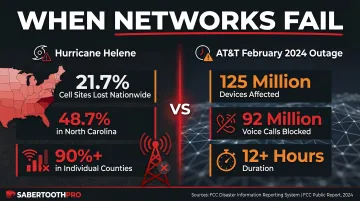
The scale of real outages makes the stakes clear. During Hurricane Helene, 21.7% of cell sites across the disaster area went dark, with North Carolina reaching 48.7% and individual counties exceeding 90%. In February 2024, an AT&T configuration error (not a natural disaster) affected over 125 million devices and blocked more than 92 million voice calls for at least 12 hours nationwide.
Rushed deployments follow a predictable pattern of failure:
- Single-carrier dependency leaves entire teams offline when one network goes down
- Misconfigured APNs block all data traffic despite showing full signal strength
- Unsecured hotspots expose sensitive business data on open networks
- Missing failover rules leave no backup when the primary signal degrades
This guide walks through the complete deployment process—from prerequisites and hardware to step-by-step configuration and post-deployment validation—so organizations stay operational when fixed infrastructure fails.
Key Takeaways
- Pre-stage hardware, verify carrier coverage, and document SOPs before a crisis hits — not after
- Follow the core sequence: assess environment → stage hardware and power → configure carrier/APN settings → broadcast network → validate performance
- Multi-carrier or dual-SIM setups dramatically reduce connectivity loss risk; single-carrier deployments are a common and costly mistake
- Post-deployment validation (signal strength, throughput, security checks) is not optional — skipping it invites failures at the worst time
- Healthcare, finance, and government deployments must meet the same security and compliance standards as permanent infrastructure
Emergency Mobile Internet Deployment Overview
The deployment process consists of four phases: pre-deployment assessment, hardware staging and power setup, network configuration, and validation. Skipping or rushing any phase compounds risk in the field.
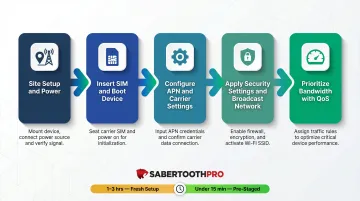
A basic single-device deployment can be live in under 15 minutes if hardware is pre-staged. A multi-device, multi-carrier business deployment with proper security configuration may take 1–3 hours and requires at least one person with networking knowledge.
Prerequisites and Readiness Checklist
Before deployment begins, assess:
- Geographic location and carrier coverage: Use carrier coverage maps to verify expected cellular signal availability, but understand these represent modeled propagation, not measured field performance
- Proximity to cell towers: Line-of-sight to the nearest tower significantly impacts signal quality
- Power availability: Determine whether site power is available or must be provided independently
- Concurrent user count: How many devices will connect simultaneously to the network
Compatibility checks:
- SIM cards match the target carrier(s) and the device's frequency bands
- Private APN credentials are documented and accessible before arriving on site
- Hardware is unlocked or carrier-compatible (don't discover incompatibility on location)
Security and compliance requirements:
Regulated industries must verify that emergency connections meet applicable data protection standards before going live:
- HIPAA: Requires transmission security over any electronic communications network
- PCI-DSS: Treats cellular as an untrusted network requiring strong cryptography
- NIST SP 800-171: Mandates wireless authentication and encryption for Controlled Unclassified Information
A VPN or encrypted tunnel is required over the mobile connection in all regulated-industry scenarios.
Non-negotiables—do not proceed if:
- There is zero carrier signal at the deployment site without a satellite fallback in place
- Power cannot be guaranteed for the duration of the event
- Sensitive data will transit the network without encryption in regulated-industry scenarios
Organizations working with managed connectivity partners such as SabertoothPro can pre-configure device profiles and APN credentials before arrival. With carrier-certified private APN solutions and multi-carrier access, this significantly cuts on-site setup time and compliance risk.
Equipment and Hardware Required
Essential hardware:
- Portable 4G LTE or 5G cellular router (not a smartphone hotspot, which has limited range and device capacity)
- Industrial-grade SIM cards with data plans from at least two carriers
- External antenna if deployment is in a low-signal area or inside a structure
- Reliable power source: high-capacity power bank, portable generator, solar charging panel, or vehicle inverter
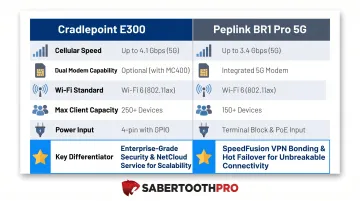
Enterprise Router Comparison:
| Feature | Cradlepoint E300 | Peplink BR1 Pro 5G |
|---|---|---|
| Cellular | 5G or Cat 18 LTE (1.2 Gbps) | 5G Sub-6GHz |
| Dual Modem | Yes (expansion slot) | No (single modem) |
| Wi-Fi | Wi-Fi 6, dual-radio | Wi-Fi 6, dual-band |
| Max Clients | Enterprise-grade | Up to 150 |
| Power | AC/DC input | 12V 2A (8W typical, 19W max) |
| Key Differentiator | SD-WAN, zero-trust, FirstNet | SpeedFusion bonding, compact |
Optional but strongly recommended:
- Ethernet cable for wired device connections
- Spare pre-configured SIM from a secondary carrier
- Ruggedized or weatherproof router enclosure for outdoor or harsh environment deployments
Substitution limits:
A smartphone hotspot can serve as a last-resort fallback but should not be the primary deployment device for business use—battery drain, device count limits (typically 5-10 connections), and heat throttling make it unreliable under sustained load. Enterprise routers support 10 to 150+ simultaneous connections with dedicated power sources and external antenna ports.
How to Deploy Emergency Mobile Internet: Step-by-Step
Deployment follows a defined order. Configuring software before hardware is stable, or activating the network before security settings are applied, is the most common cause of rework and connectivity failure.
Step 1 — Site Setup and Power
Position the router in the location with the best available line-of-sight to the nearest cell tower—elevated and away from thick walls or metal obstructions. Low-e glass blocks 99.9%+ of cellular signal, and 6-inch concrete blocks 90-98.7%. Connect the power source and confirm stable power delivery before proceeding.
Step 2 — Insert SIM and Boot Device
Insert the primary carrier SIM (and secondary SIM if using a dual-SIM device). Power on the router and allow it to register on the cellular network. Most enterprise routers display carrier registration status on an LED indicator or the web interface.
Step 3 — Configure APN and Carrier Settings
Open the router's admin interface in a browser and enter the APN name, username, and password provided by your carrier or managed service provider.
Then confirm the device is actually passing data, not just registered on the network. Registration without data throughput is the clearest sign of APN misconfiguration.
Step 4 — Apply Security Settings and Broadcast the Network
- Set a strong WiFi password
- Disable remote admin access if not needed
- Enable a VPN tunnel or firewall rules if the deployment handles sensitive data
- Broadcast the SSID to authorized devices only
- For business deployments, consider hiding the SSID and using MAC address filtering
Step 5 — Prioritize Bandwidth for Critical Applications
Use the router's QoS (Quality of Service) settings to allocate bandwidth priority to mission-critical traffic—VoIP calls, case management platforms, emergency alerts—over lower-priority traffic like general web browsing or streaming. ITU-T Recommendation G.114 defines one-way latency below 150 ms as acceptable for voice; above 400 ms is generally unacceptable.
Post-Deployment Checks and Validation
Before declaring the deployment operational, verify:
Performance validation:
- Run a speed test from a connected device and compare download/upload speeds against the carrier plan's expected performance
- Confirm latency is within acceptable range for the applications being used (VoIP requires lower latency than file uploads)
- T-Mobile leads with 177.5 Mbps overall download and 252.4 Mbps on 5G; Verizon and AT&T average 60-61 Mbps overall
Security verification:
- Confirm the VPN tunnel is active and passing traffic if required
- Verify that the admin interface is password-protected
- Ensure no unauthorized devices have joined the network
Signal quality indicators:
| Rating | RSRP (dBm) | SINR (dB) |
|---|---|---|
| Excellent | ≥ -80 | ≥ 20 |
| Good | -80 to -90 | 13 to 20 |
| Fair | -90 to -100 | 0 to 12 |
| Poor | < -100 | < 0 |
A correctly deployed setup shows stable signal strength (typically -85 dBm or better), consistent throughput, and no authentication errors in the device log. If any of the following appear, revisit configuration before going live:
- Persistent APN errors — recheck carrier APN settings and SIM provisioning
- Zero data throughput despite carrier registration — confirm the correct data profile is assigned to the SIM
- IP address conflicts — verify DHCP scope and check for overlapping subnets across connected devices
Common Deployment Problems and How to Fix Them
Most field deployment failures fall into three categories and are fixable within minutes if the technician knows what to look for.
Weak or No Cellular Signal at the Deployment Site
Problem: Router shows carrier registration but data speeds are extremely low, or the device fails to register on the network entirely.
Likely cause: Physical obstructions (thick walls, terrain, distance from tower) or the wrong frequency band selected by the device for that carrier.
Fix: Start with these steps in order:
- Reposition the router to a higher or more open location
- Attach an external directional antenna aimed toward the nearest tower
- Manually lock the router to a specific LTE band via the admin interface
For T-Mobile, prioritize Bands 2, 4, 12, and 71 (600 MHz Extended Range LTE). On AT&T/FirstNet, Band 14 transmits at 1.25W versus 0.2W on commercial bands — extending effective range by up to 80%.
APN Configuration Errors Blocking Data Traffic
Problem: Device is registered on the carrier network and shows signal strength, but no data traffic passes—browsers timeout and speed tests fail.
Likely cause: Incorrect APN name, username, or password entered; common when switching between carriers or using a private APN for a business account.
Fix: Access the router's admin interface, navigate to the mobile data/APN settings, and verify credentials against carrier or managed service provider documentation. Reset the data connection after saving changes.
Power Failure or Brownout Mid-Deployment
Problem: Router reboots or loses connection mid-operation due to insufficient or unstable power delivery.
Likely cause: Undersized power bank depleted faster than expected under router load, or generator voltage fluctuation causing the router to reset.
Connect a UPS or a higher-capacity power bank rated for the router's wattage draw. For generator setups, place a surge-protected power strip between the generator output and the router to smooth voltage irregularities.
Enterprise routers draw 7.5W to 19W at peak load — a 100Wh portable UPS covers approximately 5-13 hours of runtime depending on the unit.
Pro Tips for Effective Emergency Internet Deployment
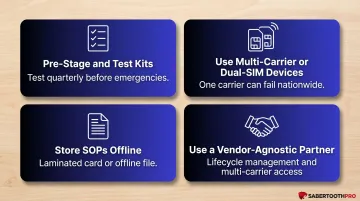
Pre-stage and test kits before an emergency occurs. Power on the router, insert SIMs, configure APN settings, and run a connectivity test at least quarterly. Discovering a firmware issue or an expired data plan during a disaster rather than before it is an avoidable failure.
Use multi-carrier or dual-SIM devices wherever possible. FCC DIRS activations rose from 1 in 2016 to 7 in 2024, reflecting accelerating demand for emergency connectivity. The AT&T February 2024 outage proved a single carrier can fail nationwide even without a physical disaster, blocking over 92 million voice calls for 12+ hours. A second SIM from a different carrier on separate network infrastructure improves resilience considerably.
Create and store deployment SOPs offline. Document the exact APN settings, admin interface login credentials, SSID/password, and step-by-step setup sequence in a printed laminated card or an offline document stored on each device. Network engineers who configured the system are often unavailable when deployment is needed.
Work with a vendor-agnostic connectivity partner. Organizations managing deployments across multiple locations benefit from a partner like SabertoothPro, which handles lifecycle management from device configuration through real-time monitoring. That means emergency kits stay deployment-ready, and teams get multi-carrier access without managing separate carrier relationships.
Conclusion
Emergency mobile internet deployment quality determines whether a business can operate or goes dark during a crisis. The hardware alone is not enough; proper configuration, security hardening, and post-deployment validation are what make it reliable when it matters most.
Organizations that treat emergency connectivity as a planned infrastructure component — budgeted, tested, and documented before any crisis hits — recover faster and spend less. Pre-staged, tested, and documented deployments close the gap between when a disaster strikes and when teams are back online. With 90% of mid-size and large enterprises facing downtime costs exceeding $300,000 per hour, a single avoided outage can cover the full cost of preparation many times over.
Frequently Asked Questions
What is the best communication device for emergencies?
Portable LTE/5G cellular routers are the most reliable option for business and team use. They support 10 to 150+ simultaneous users, hold connections longer than smartphone hotspots, and accept external antennas and backup power sources for field deployments.
How quickly can emergency mobile internet be deployed?
A pre-staged deployment with pre-configured SIMs and APN settings can be operational in under 15 minutes. A fresh setup requiring on-site configuration takes 1–3 hours depending on the number of devices, security requirements, and signal conditions.
What equipment is needed for emergency mobile internet deployment?
The core kit includes a portable LTE/5G cellular router, industrial SIM cards with active data plans on at least two carriers, an external antenna for low-signal environments, and a reliable backup power source such as a high-capacity power bank, portable generator, or solar panel.
Can emergency mobile internet support multiple users at the same time?
Enterprise-grade portable routers support 10 to 64+ simultaneous devices — the Peplink BR1 Pro 5G reaches up to 150. Real-world performance depends on available cellular bandwidth, plan throughput limits, and whether QoS is configured to prioritize critical applications.
How do you secure a mobile internet connection during an emergency deployment?
At minimum: set a strong WiFi password, enable a VPN for sensitive data, and apply firewall rules through the router's admin interface. For regulated industries, verify the connection meets applicable standards (HIPAA, PCI-DSS, CMMC) before transmitting any sensitive information.
What is the difference between a mobile hotspot and a portable LTE router for emergency use?
A mobile hotspot (smartphone or compact MiFi) activates quickly and works for personal or small-team use, but tops out at 5–10 connected devices with limited battery life and no enterprise configuration options. A portable LTE router handles more users, supports QoS and firewall settings, accepts external antennas, and runs on dedicated power. For sustained field deployments, the router is the right tool.