

Active-passive and active-active represent the two primary approaches to internet redundancy and high availability. Choosing the wrong one can mean the difference between seamless uptime and frustrating recovery delays. The former keeps a backup connection on standby, activating only when the primary fails; the latter runs multiple connections simultaneously, distributing traffic across both. Each serves different business contexts, uptime requirements, and budget constraints.
This article covers how each configuration works, their operational trade-offs, and a practical framework for deciding which fits your business—whether you're a small retail location tolerating brief interruptions or a healthcare provider requiring near-perfect uptime for EHR access.
Key Takeaways
- Active-passive keeps a backup connection on standby, activating only when the primary link fails. Simpler and cheaper, but expect a brief switchover delay
- Active-active runs connections simultaneously, distributing traffic across both for higher performance and near-zero failover time
- Smaller businesses and non-time-critical applications are the sweet spot for active-passive, where occasional brief downtime is acceptable
- Active-active fits organizations with strict uptime SLAs, latency-sensitive applications (VoIP, cloud ERP, payments), or high transaction volumes
- Your choice depends on uptime requirements, traffic volume, and the total cost of downtime versus redundancy investment
Active-Passive vs. Active-Active: Quick Comparison
| Dimension | Active-Passive | Active-Active |
|---|---|---|
| Failover Time | Seconds to minutes (typically 30-90 seconds with standard monitoring) | Near-instantaneous (sub-second with proper configuration) |
| Bandwidth Utilization | Secondary link idle during normal operations; underutilized | Both links carry traffic continuously; full utilization |
| Cost of Implementation | Lower—secondary bandwidth essentially unused, simpler hardware | Higher—requires full capacity on both links plus load balancer or SD-WAN platform |
| Configuration Complexity | Simple monitoring with basic failover scripts or floating routes | Requires intelligent traffic distribution, health monitoring, and policy-based routing |
| Ideal Use Case | SMBs, back-office systems, branch offices with moderate digital workloads | High-availability environments, VoIP, cloud ERP, payment processing, real-time applications |
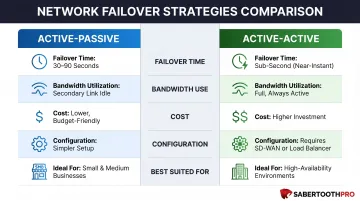
Both configurations require redundant connections: dual ISP or multi-WAN infrastructure. The real difference isn't what happens during an outage — it's how each model uses those connections every day.
Hybrid approaches are increasingly common in real deployments, blurring the lines between these two pure models. Typical configurations include:
- Weighted active-active: one link carries the majority of traffic while the secondary stays partially loaded
- Tiered primary/secondary: different link types handle different workloads, such as fiber for primary traffic and LTE as a cost-effective backup
- Policy-based routing: specific application types (VoIP, backup data) are steered to whichever link best fits their requirements
These setups let businesses tune cost, performance, and resilience rather than choosing one extreme.
What Is Active-Passive Internet Connectivity?
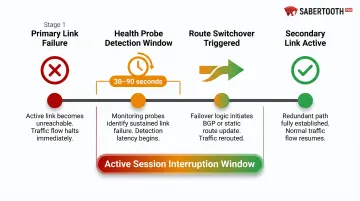
Active-passive configurations designate one internet connection as primary, handling all traffic under normal conditions, while the secondary connection sits idle in standby. A monitoring system continuously checks the health of the primary link through methods like ICMP ping, HTTP/HTTPS probes, or more sophisticated protocols.
When failure is detected, the system triggers a switchover, rerouting traffic to the secondary connection.
How Failover Actually Works
The detection window determines how quickly problems get noticed. Standard IP SLA monitoring uses 60-second probe intervals with 5-second timeouts, meaning detection can take roughly 65 seconds. Tighter probe intervals shorten this window but add router overhead. Once failure is detected, the system reroutes traffic—either by updating routing tables, activating floating static routes, or switching active interfaces. This brief gap represents the key trade-off: during this recovery time objective (RTO), active sessions may drop or experience interruption.
Core Benefits for Businesses
Active-passive delivers practical advantages for many organizations:
- Lower cost—secondary bandwidth sits unused during normal operations, eliminating the need to pay for full capacity on both links
- Simpler configuration—basic monitoring scripts or router failover features handle the job without advanced load-balancing infrastructure
- Reduced complexity—fewer moving parts mean less to manage, troubleshoot, and maintain
The Key Limitation
During the failover window (whether 30 seconds or two minutes), active sessions drop—a VoIP call cuts out, a cloud application times out, a payment transaction fails mid-process. For some businesses, this matters little. For others running real-time applications or revenue-critical transactions, even 60 seconds creates unacceptable business impact.
Use Cases of Active-Passive
Active-passive makes practical sense in specific business scenarios:
- SMBs with general-purpose internet needs—browsing, email, file transfers, and basic cloud applications that tolerate brief interruptions
- Back-office systems—HR platforms, internal documentation, administrative functions where a minute of downtime doesn't disrupt operations
- Early-stage businesses—companies building digital reliance but not yet dependent on real-time cloud systems
- Environments targeting 99.9% uptime (three nines, or roughly 8.76 hours of annual downtime)—acceptable for many non-critical applications
Real-world deployments tend to follow a similar pattern across industries:
- Small retail locations with point-of-sale systems that can queue transactions
- Branch offices supporting email and document sharing
- Legal and insurance firms with moderate digital workloads
- Remote sites acting as backup nodes in larger disaster recovery strategies
What Is Active-Active Internet Connectivity?
Active-active configurations run two or more internet connections simultaneously, with traffic distributed across both links during normal operations. No connection sits idle—both carry real workloads at all times. This eliminates the concept of a "standby" link and fundamentally changes how networks handle failures.
How Traffic Distribution Works
Active-active setups use a load balancer or SD-WAN platform to route packets intelligently. The SD-WAN market reached $5.3 billion in 2023 with 14.1% annual growth, driven largely by the need for intelligent active-active configurations. These platforms route traffic based on:
- Monitors link health in real time, detecting degradation or congestion before it affects users
- Routes latency-sensitive traffic over the lowest-latency path available
- Spreads load across links to prevent any single connection from saturating
- Prioritizes application type: VoIP, video, and transactional traffic get first-class routing
This enables full utilization of available bandwidth and intelligent path selection without manual intervention.
Key Operational Benefits
Active-active delivers measurable advantages for high-availability environments:
- Failover is near-instant: since the secondary link already carries traffic, a failure shifts load rather than triggering detection and rerouting from scratch
- Combined bandwidth from both links increases total throughput capacity
- Latency-sensitive workloads automatically route over the fastest available path
- Adding links scales capacity without requiring architectural changes
The Important Trade-Off
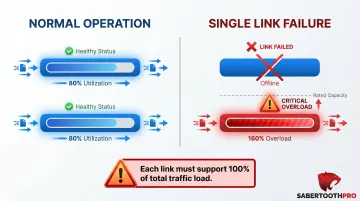
These performance gains come with a planning requirement. Both links operating near capacity means a single-link failure dumps the full load onto whatever remains. If each link runs at 80% utilization and one fails, the surviving link suddenly absorbs 160% of its rated capacity.
Capacity planning isn't optional here. Each link needs enough headroom to carry the entire traffic load solo during a failure — otherwise, a single outage creates a second performance problem on the surviving connection.
When to Use Active-Active
Active-active configurations fit organizations with strict performance and availability requirements:
- Uptime SLAs requiring 99.99% or higher (four nines, or roughly 52 minutes of annual downtime)—acceptable only in high-availability environments
- High-volume transaction environments—e-commerce platforms, payment processors, booking systems where every second of downtime impacts revenue
- Real-time or latency-sensitive applications—UCaaS platforms, VoIP, cloud ERP, video conferencing, patient management systems
Industry examples include:
- Healthcare providers accessing EHR platforms—where HIPAA requires contingency plans ensuring ePHI availability but doesn't specify uptime percentages
- Financial services firms running payment processing—where PCI-DSS compliance demands secure, continuous transaction capabilities
- E-commerce operations during peak shopping periods
- Multi-location businesses running unified communications
SD-WAN platforms make these configurations manageable at scale by automating policy-based routing across multiple carriers without manual intervention. SabertoothPro deploys SD-WAN solutions through a 300+ partner ecosystem, giving mid-sized organizations access to active-active configurations without requiring dedicated network engineering staff to maintain them.
Active-Passive vs. Active-Active: Which Architecture Is Right for Your Business?
The decision centers on three business-driven factors, not just technology preferences or vendor recommendations.
Factor 1: Uptime Tolerance
Can your operations sustain even a 30-to-90-second failover window? If a dropped VoIP call, interrupted transaction, or timed-out application session causes material business impact, active-passive introduces unacceptable risk. If brief interruptions mean minor inconvenience—delayed emails, temporary website slowdowns—active-passive delivers sufficient protection.
Factor 2: Application Criticality
Real-time applications impose strict requirements. VoIP requires less than 150ms latency, under 1% packet loss, and jitter below 100ms to maintain call quality. Cloud ERP platforms time out during extended interruptions, corrupting in-progress transactions. Payment processing systems fail mid-authorization, creating revenue loss and customer frustration.
For businesses running VoIP, cloud ERP, or payment systems, active-active isn't optional infrastructure — it's the baseline requirement for keeping those applications operational.
Factor 3: Budget vs. Downtime Cost
The difference between 99.9% and 99.99% uptime translates to roughly 8.2 hours of annual downtime versus 52 minutes. What happens during those 8 hours (or 52 minutes) determines whether the investment in active-active justifies itself.
Consider the revenue impact:
- Retail: Lost transactions, abandoned carts, brand damage
- Healthcare: Delayed patient care, compliance exposure, operational disruption
- Finance: Failed transactions, regulatory risk, customer churn
- Manufacturing: Production line stoppages, order fulfillment delays
If even one hour of downtime costs more than the annual incremental investment in active-active infrastructure (load balancer, SD-WAN platform, and full capacity on both links), the architecture pays for itself in the first incident.
Practical Decision Guidance
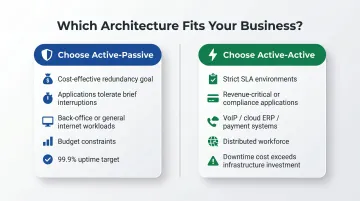
Choose active-passive if:
- Your primary goal is cost-effective redundancy
- Applications tolerate brief interruptions without material business impact
- You operate back-office systems or general-purpose internet workloads
- Budget constraints limit infrastructure investment
- You're targeting 99.9% uptime (three nines)
Choose active-active if:
- You operate in a high-availability environment with strict SLAs
- You run revenue-critical or compliance-sensitive applications
- Your business depends on VoIP, cloud ERP, payment processing, or real-time systems
- You support a distributed workforce requiring consistent cloud connectivity
- Downtime costs exceed the incremental investment in active-active infrastructure
The Evolutionary Path
Many growing businesses start with active-passive and migrate toward active-active as digital reliance increases. A small law firm using basic cloud email can tolerate 60-second failovers. As they add VoIP, cloud-based practice management systems, and remote workers accessing applications continuously, brief interruptions become unacceptable.
That migration path is where architecture decisions get expensive if you pick the wrong starting point. Working with a vendor-agnostic advisor — SabertoothPro draws on a 300+ partner ecosystem — means you can evaluate carrier mix, SD-WAN platforms, and failover configurations without being steered toward a single provider's solution. As your digital footprint grows, that flexibility lets you adapt rather than renegotiate from scratch.
Conclusion
Active-passive and active-active aren't competing technologies—they're different tools for different uptime requirements. Active-passive delivers cost-effective redundancy with brief failover delays. Active-active provides near-zero downtime with higher cost and complexity. Businesses should evaluate actual downtime tolerance, application criticality, and growth trajectory, not just upfront cost, before committing to an architecture.
As healthcare, finance, logistics, and retail operations move deeper into the cloud, the tolerance for downtime continues to shrink. What works today may not hold up as digital dependency grows.
Start with the architecture that fits your current risk threshold. Build in the flexibility to scale toward active-active as your uptime requirements demand it.
Frequently Asked Questions
What is the difference between active-active and active-passive network?
In an active-passive network, one connection handles all traffic while the secondary stays on standby, activating only during primary link failure. In active-active, both connections run simultaneously and share traffic load, resulting in better performance and near-zero failover time.
How do I check whether a cluster is active-active or active-passive?
Verify this by checking your router, load balancer, or SD-WAN dashboard. Active-active setups show traffic flowing across multiple links simultaneously, while active-passive setups show only the primary link carrying traffic unless a failover event has occurred.
Is active-active more expensive than active-passive?
Yes, active-active typically costs more because it requires full capacity on both links and often a load balancer or SD-WAN platform to manage traffic distribution. However, total cost of ownership may be lower when factoring in revenue impact and productivity loss from downtime.
Can active-passive provide sufficient uptime for most small businesses?
Active-passive redundancy delivers acceptable uptime (around 99.9%) for SMBs with general-purpose internet needs. It works well provided your applications can tolerate brief switchover windows and your failover monitoring is properly configured.
What role does SD-WAN play in active-active internet configurations?
SD-WAN enables intelligent active-active configurations by dynamically routing traffic across multiple ISP connections based on real-time link health, latency, and application policy. This automates the load distribution that would otherwise require manual routing rules and ongoing administrative overhead.
What is the typical failover time in an active-passive setup?
Failover time in active-passive configurations typically ranges from a few seconds to a few minutes depending on the health monitoring interval and routing protocol used. Cutting that window down means tightening your polling intervals and using a protocol like BFD or IP SLA rather than standard BGP keepalives.