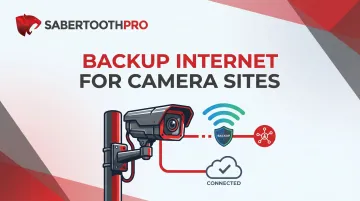
The core problem is simple: most camera deployments run on a single ISP connection. One outage—from a downed line, scheduled maintenance, or severe weather—can leave an entire property unmonitored for hours. Worse, deliberate network disruption has become a documented tactic used before break-ins, making internet redundancy a physical security measure, not just an IT checkbox.
This guide explains why backup internet is essential for camera sites, what happens when connectivity fails, and how to select the right failover solution based on site type, camera count, and budget.
Key Takeaways
- Backup internet keeps remote viewing, cloud recording, and alerts active when the primary ISP fails
- 4G/LTE cellular failover is the most common solution for camera sites; 5G and satellite fill gaps for high-demand or off-grid locations
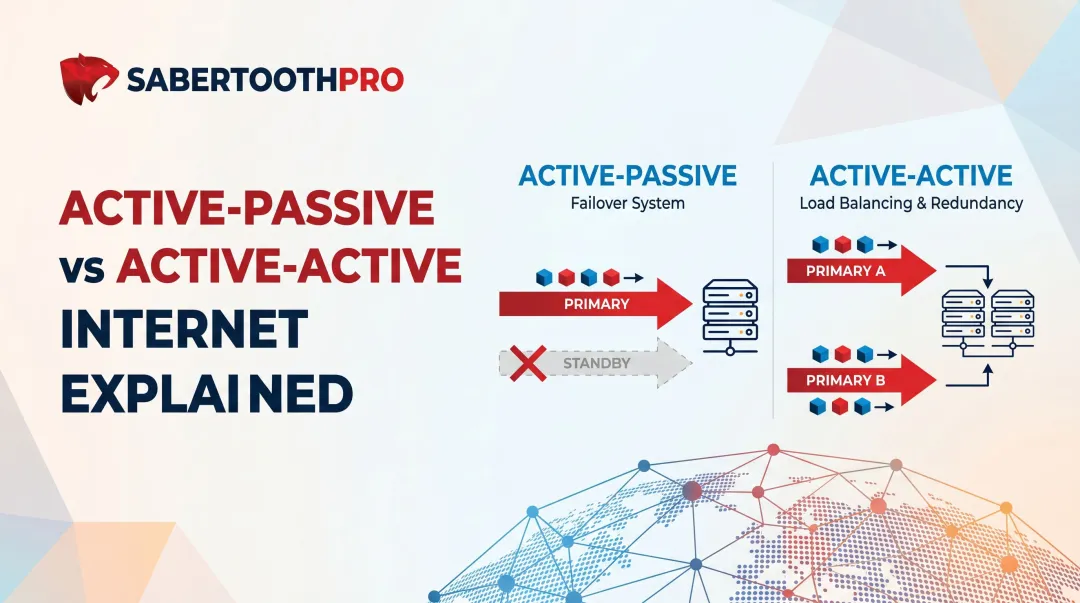
- Automatic failover routers detect a dropped primary connection and switch to backup in seconds
- Plan for 1–2 Mbps upload per active camera to maintain critical feeds during outages
- Multi-site deployments benefit from multi-carrier access and pooled data plans to control costs and maximize uptime
Why Camera Sites Can't Afford Internet Downtime
IP camera systems across retail, construction, healthcare, logistics, and franchise environments increasingly depend on cloud connectivity. Live streams route offsite, motion events trigger cloud uploads, and operators monitor properties remotely. All of these functions cease the moment internet access drops.
According to ITIC's 2024 survey of 1,000+ firms, 90% of mid-size and large enterprises report hourly downtime costs exceeding $300,000, with 41% experiencing costs between $1 million and $5 million per hour. Even micro-SMBs now exhibit "zero tolerance" for outages that halt business operations.
Regulatory and Insurance Exposure
Many industries require continuous video evidence for compliance. NIST SP 800-53 Control PE-6(3) requires organizations to deploy video surveillance, review recordings at defined frequencies, and retain footage for specified periods—though it stops short of mandating 24/7 continuous recording. The compliance risk comes from being unable to produce footage during auditable windows, not from a specific "always-on" mandate.
That gap has financial consequences beyond regulators. Footage missing during an outage can void insurance claims or expose organizations to legal liability when incidents occur during downtime. High-net-worth insurers have begun requiring hardwired security systems as a condition of coverage precisely because of connectivity vulnerability.
Physical Security Risk
Internet disruption is now a known tactic used before break-ins. U.S. Customs and Border Protection reports an approximately 830% increase in signal jammer seizures since 2021, with DHS documenting jammer use in bank robberies and commercial burglaries. Professional crews target WiFi-dependent security systems by jamming signals or cutting fiber lines immediately before entry.
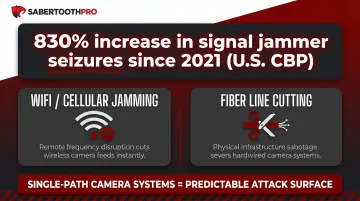
Internet redundancy, in this context, is a direct security countermeasure. A single-path camera system gives professional crews a predictable attack surface—one cut line or one jammed signal and surveillance goes dark on demand.
Remote Sites Face Compounded Risk
Remote and temporary camera deployments carry compounded risk because there's no one on-site to catch an outage when it happens. Common examples include:
- Construction trailers and jobsite perimeter cameras
- Pop-up retail and seasonal event monitoring
- Off-grid agricultural and utility infrastructure
Without automatic failover, the first sign of trouble is often reviewing footage after the fact—and finding nothing recorded. By then, the window for intervention is already closed.
What Happens When Your Camera Site Loses Connectivity
Cloud Recording and Offsite Backup Stop Immediately
Cameras continue recording locally to NVR/DVR storage during an outage, but no events sync to the cloud until connectivity restores. This creates a gap in the offsite archive that may never be recovered if local hardware is stolen or damaged during the outage.
Verkada cameras, for example, continue recording locally when the network drops, but cloud access, remote viewing, and real-time alerts cease immediately. Footage can be backfilled after reconnection, but any real-time cloud gap during the outage remains unrecoverable if local storage is compromised.
Remote Live Viewing Goes Dark
Operators, security staff, and business owners lose real-time visibility from phones, browsers, or VMS dashboards. It becomes impossible to:
- Verify alarms
- Check in on a site remotely
- Direct a response to an incident in progress
Push Notifications and Motion Alerts Fail
Even if the camera detects a person crossing a perimeter line or a motion event in a restricted zone, no one is notified until connectivity restores. AI-triggered event alarms, push notifications, and email alerts all depend on an active internet path to reach the operator.
Integrated Systems Go Offline Simultaneously
Access control panels, alarm monitoring services, video verification platforms, and third-party dispatch integrations that rely on the same internet connection also go offline. A single connection failure can simultaneously blind your cameras, silence your alarms, and cut off dispatch — leaving no redundant layer to catch what the others miss.
Backup Internet Options for Camera Sites
Cellular (4G LTE) Failover
4G LTE cellular failover is the most widely deployed backup option for camera sites. A failover router or cellular gateway maintains a standby SIM connection that activates automatically when the primary ISP link fails, restoring cloud uploads, remote viewing, and alert paths within seconds.
Key considerations:
- Median U.S. mobile upload speeds range from 14.2 to 23.1 Mbps across major carriers (T-Mobile, Verizon, AT&T), sufficient for multiple 720p camera substreams
- Subject to carrier-level congestion, data caps, and coverage gaps in rural areas
- Multi-carrier SIM solutions mitigate single-carrier coverage risk
5G Fixed Wireless Backup
5G backup connections offer substantially higher throughput than LTE, making them viable for larger camera deployments (8–32+ cameras) where multiple simultaneous cloud uploads require more bandwidth. T-Mobile ended 2025 with 8.5 million fixed wireless access subscribers.
Coverage note: 5G availability remains uneven outside metro areas and should be verified on a site-by-site basis before committing to this as a backup path.
Dual-WAN with a Secondary Wired ISP
Dual-WAN failover is the most robust option for fixed commercial sites. A router connects to two separate wired ISPs (fiber + cable, for example) and automatically routes camera traffic to the secondary ISP when the primary fails. This approach eliminates cellular data costs while providing near-identical bandwidth on the backup link.
Best for: Permanent commercial facilities with access to multiple wired ISPs.
SD-WAN with Bonded or Aggregated Connections
SD-WAN solutions can bond multiple connections—wired + cellular, or dual-cellular—into a single logical pipe, dynamically routing camera traffic across whichever paths are healthy. This delivers both redundancy and performance optimization through a single managed overlay.
Approximately 26% of organizations have fully deployed SD-WAN, with another 19% actively deploying—but 44% are still in the planning phase, meaning most commercial sites still lack automated multi-WAN failover.
Best for: Multi-site deployments or locations with mixed wired and cellular connections that need intelligent path selection.
Satellite (Starlink) for Remote and Off-Grid Sites
For sites where terrestrial ISP and cellular coverage are insufficient, low-earth orbit satellite—specifically Starlink—serves as the primary or backup connectivity option. It's particularly relevant for remote agricultural, construction, and off-grid camera deployments.
Starlink performance specs:
- Download: 45–280 Mbps (majority over 100 Mbps)
- Upload: 10–30 Mbps
- Latency: 25–60 ms (land); 100+ ms (remote/ocean)
PCMag's multi-year testing from rural Idaho confirms real-world performance consistent with these ranges. Upload capacity of 10–30 Mbps supports multiple 720p camera substreams but may be constrained for full-resolution multi-camera cloud recording.
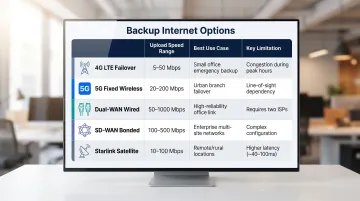
Quick comparison across all five options:
| Option | Typical Upload Speed | Best Use Case | Key Limitation |
|---|---|---|---|
| 4G LTE Failover | 14–23 Mbps | Most commercial sites | Data caps, rural coverage gaps |
| 5G Fixed Wireless | 50–150 Mbps | Larger deployments (8–32+ cameras) | Uneven metro/rural availability |
| Dual-WAN (Wired ISPs) | Matches primary link | Permanent facilities, fixed sites | Requires two ISP providers on-site |
| SD-WAN (Bonded) | Combined path throughput | Multi-site, mixed connections | Higher setup complexity and cost |
| Starlink (Satellite) | 10–30 Mbps upload | Remote/off-grid sites | Higher latency; weather-sensitive |
How Automatic Failover Works
Failover routers continuously monitor the health of the primary WAN connection using heartbeat checks—pinging known external IPs or the ISP gateway at regular intervals. When the primary fails, the router triggers a switchover to the backup link within seconds, with no human intervention required.
Cold Standby vs. Warm Standby
The right standby mode depends on how much downtime your camera site can tolerate:
| Mode | How It Works | Tradeoff |
|---|---|---|
| Cold standby | Backup link stays dormant until the primary fails | Lower data costs; ~40-second detection delay (Cradlepoint default: 8-second ping interval, 5 retries) |
| Warm/active standby | Backup link stays partially active at all times | Near-instant switchover; better for live streams and active cloud uploads |
Automatic Failback
Once the primary ISP connection is restored and passes health checks for a configurable period (typically 90 seconds), traffic routes back to the primary link and queued cloud uploads resume. For camera sites in remote or unmanned locations, that means outages resolve on their own — no truck roll, no missed footage.
Bandwidth Planning for Camera Sites
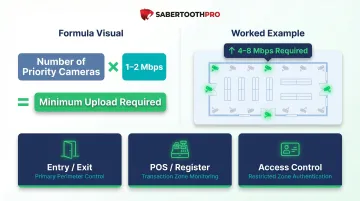
Each camera actively uploading to the cloud requires approximately 1–2 Mbps of upload bandwidth at substream resolution (720p). Multiply by the number of cameras expected to trigger simultaneously to calculate the minimum required upload capacity for the backup connection.
Tiered Approach to Backup Bandwidth
The backup internet link does not need to match the full capacity of the primary connection. A tiered approach works well: route only high-priority cameras over the backup link during an outage to stay within a smaller cellular data allotment while preserving the most critical footage.
High-priority camera zones typically include:
- Entry and exit points
- Cash registers and POS terminals
- Critical access control zones
For a practical reference: a 16-camera retail site with 4 entry-point cameras designated as backup-priority needs roughly 4–8 Mbps of upload on the backup link to maintain cloud sync and remote viewing during an outage.
Choosing the Right Backup Internet Solution
Selecting the right failover solution depends on several key factors:
- Site type: Fixed commercial vs. temporary/remote
- Camera count and resolution: Higher camera counts and resolutions demand more upload capacity
- Acceptable failover switchover time: Instant vs. 30–60 seconds
- Monthly data budget: Cellular plans with caps vs. unlimited wired connections
- Multi-site deployment needs: Centralized management and pooled data plans
Once you've mapped out those requirements, the next decision is whether to handle the deployment yourself or bring in a managed provider.
DIY vs. Managed Connectivity
DIY failover works well for single-site deployments with straightforward requirements. Purchasing and configuring a cellular failover router independently is often the fastest path for smaller setups.
Multi-site deployments, complex camera networks, and regulated industries are a different story. A managed approach adds:
- Multi-carrier access to eliminate single-carrier risk
- Centralized monitoring and alerting
- Pooled data plans that cut per-site overages
- Vendor-agnostic consulting to identify the right architecture
SabertoothPro provides vendor-agnostic connectivity consulting and carrier-certified Private APN access across 300+ providers. Businesses can identify the right architecture for their camera sites — LTE failover, 5G, dual-WAN, or SD-WAN — without being tied to a single carrier.
Frequently Asked Questions
How can I set up backup internet for my camera site?
The most straightforward approach is adding a cellular failover router to your existing network, connecting it to a backup SIM, and configuring it to activate automatically when the primary ISP goes down. NVR/DVR systems reconnect to the new path and resume cloud uploads without any camera-side changes.
What happens to my security cameras when the internet goes out?
Cameras continue recording locally to NVR/DVR storage during an internet outage, but remote viewing, cloud backup, motion alert notifications, and integrations with alarm monitoring services all go offline until connectivity is restored.
What internet speed do I need for security cameras on a backup connection?
A general rule is 1–2 Mbps of upload per camera actively syncing to the cloud. A backup connection only needs to cover the most critical cameras (not all channels) to preserve evidence and remote visibility during an outage.
What is the best backup internet option for remote camera sites?
For remote or off-grid sites with limited cellular coverage, low-earth orbit satellite (Starlink) works well as a primary or backup connection. For sites with cellular coverage, a multi-carrier LTE/5G failover router provides the most cost-effective and automatic solution.
Does a 4G LTE failover router work with IP cameras and NVR systems?
Yes. LTE failover routers are fully compatible with IP camera systems. The NVR or DVR sees no change in its local network configuration, and cloud recording, remote viewing apps, and alert paths resume automatically once the failover router switches to the cellular link.
Can someone access my camera without me knowing?
Yes. Cameras with weak passwords, unpatched firmware, or exposed ports are vulnerable to unauthorized access. Without failover, an outage also creates monitoring gaps where intrusions go undetected. That's why access security and connectivity redundancy both matter.