Introduction
Picture this: your team arrives Monday morning to find every server encrypted by ransomware, demanding a six-figure ransom. Or a regional power outage knocks your data center offline indefinitely. Or a natural disaster wipes out your on-premise infrastructure entirely. One question separates businesses that survive from those that close their doors: how fast can you recover?
According to federal disaster assistance research, 40% of businesses never reopen after a disaster, and another 25% fail within a year. For small and mid-sized businesses with 20-100 employees, a single hour of downtime costs up to $100,000. This isn't just an IT problem—it's a business survival mandate.
Cloud disaster recovery changes the equation. By replicating your critical infrastructure and data to secure cloud environments, it cuts recovery time from days to minutes—without the cost of a secondary data center. Modern cloud DR puts enterprise-grade resilience within reach for businesses that couldn't justify traditional recovery infrastructure. This guide covers how it works, the main deployment models, what to look for in a provider, and how to size a solution for your organization.
Key Takeaways
- Cloud disaster recovery replicates your IT infrastructure to the cloud, enabling rapid failover when primary systems go down due to cyberattacks, hardware failures, or natural disasters
- Two metrics govern every DR plan: RTO (Recovery Time Objective—how fast you recover) and RPO (Recovery Point Objective—how much data you can lose)
- Cloud DR costs far less than traditional approaches by replacing capital-heavy hardware with scalable, pay-as-you-go infrastructure
- Immutable backups and air-gapped storage are your ransomware defense — ensuring clean recovery without paying a ransom
- Test quarterly: 56% of organizations skip full DR simulations, and 35% of untested plans fail when disaster actually hits
What Is Cloud Disaster Recovery?
Cloud disaster recovery (often delivered as Disaster Recovery as a Service, or DRaaS) is a third-party-managed solution that replicates an organization's critical IT infrastructure, applications, and data to cloud-hosted environments. When primary systems fail (whether from ransomware attacks, power outages, hardware failures, or natural disasters), cloud DR enables rapid failover to the replicated environment, maintaining business continuity with minimal disruption.
Unlike traditional backup solutions that only store copies of data, cloud DR replicates your entire IT stack, including compute resources, networking configurations, and application environments. This allows organizations to resume operations in minutes rather than hours or days.
Understanding RTO and RPO
Every cloud DR plan is built around two foundational metrics defined by NIST SP 800-34:
- Recovery Time Objective (RTO): The maximum acceptable time to restore operations after a disruption. This determines how quickly your business must be back online.
- Recovery Point Objective (RPO): The maximum amount of data loss your organization can tolerate, measured in time between backups. An RPO of 15 minutes means you can afford to lose no more than 15 minutes of data.
These targets must be established through a formal Business Impact Analysis that maps system criticality to actual business survival requirements. A financial trading platform may require near-zero RTO and RPO (measured in seconds), while a standard back-office system might tolerate 4-24 hours for recovery.
Failover and Failback Mechanics
When disaster strikes, cloud DR providers detect the outage and trigger failover: switching operations to the replicated cloud environment. Automated orchestration handles the heavy lifting:
- Spins up virtual machines in the cloud environment
- Restores networking configurations and DNS routing
- Redirects user traffic with sub-minute switchover times
- Maintains application access without user-facing errors
Once primary infrastructure is restored, failback reverses the process. Any data changes made during the failover period are synchronized back to the original environment, so nothing is lost in the transition.
Disaster Recovery as a Service vs. Backup as a Service
Backup as a Service (BaaS) and DRaaS serve fundamentally different purposes, though they're often confused:
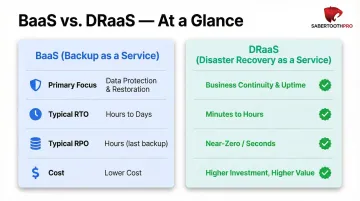
BaaS only stores copies of data in secure offsite locations. Recovery requires retrieving backups, provisioning infrastructure, reinstalling applications, and manually restoring data — a process that takes hours or days. BaaS protects against data loss but doesn't address business continuity.
DRaaS replicates the full IT stack (infrastructure, networking, applications, and data) to a ready-to-run cloud environment. Recovery happens in minutes instead of hours or days, and service-level agreements (SLAs) guarantee specific RTO and RPO targets. DRaaS is the stronger choice for organizations that cannot tolerate prolonged downtime.
| Feature | BaaS | DRaaS |
|---|---|---|
| Primary Focus | Data loss protection | Full-system recovery and business continuity |
| Typical RTO | Hours to days | Seconds to minutes |
| Typical RPO | Hours to daily | Seconds to minutes |
| Cost | Lower (storage-focused) | Higher (compute + orchestration) |
The Three DRaaS Delivery Models
Cloud DR providers offer three service models:
- Self-Service: Your IT team manages the DR environment using provider tools and infrastructure. Best for organizations with mature IT departments that want control over recovery processes.
- Assisted: The provider helps plan, implement, and test your DR plan, but your team maintains shared responsibility for execution. Suited for growing businesses building internal capabilities.
- Managed: The provider fully owns and operates your DR environment, including testing, monitoring, and recovery execution. Ideal for SMBs without dedicated IT staff or those requiring guaranteed recovery outcomes.
How Cloud Disaster Recovery Works
Cloud DR operates through continuous or scheduled replication, automated failover orchestration, and on-demand infrastructure activation. Understanding each phase helps organizations set realistic expectations and configure solutions that meet their specific RTO and RPO targets.
Continuous Replication Phase
The cloud DR provider continuously or periodically captures snapshots of your servers, virtual machines, applications, and data, transmitting them to a secure cloud environment. Replication frequency directly determines your RPO—mission-critical workloads often use near-continuous replication (every few minutes or seconds), while less critical systems may replicate hourly or daily.
Replication happens at the block or byte level, tracking only modified data after the initial full sync — minimizing bandwidth consumption while keeping even large databases current.
Disaster Detection and Automated Failover
When a disaster occurs — whether detected automatically through monitoring tools or declared manually by your team — the provider initiates failover. The cloud environment spins up pre-configured virtual machines, restores networking configurations, and activates the replicated workloads.
Automated orchestration handles the steps that would otherwise cause costly delays. Scripts execute in the correct dependency order to manage:
- DNS updates and traffic redirection
- Load balancer reconfiguration
- Application startup sequences
Users are redirected to the cloud environment, often without noticing the transition.
On-Demand Infrastructure Economics
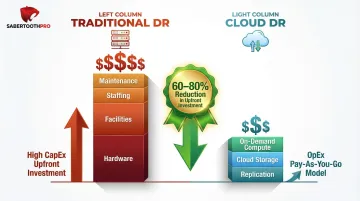
Traditional DR means maintaining a fully redundant secondary data center — dedicated servers, storage arrays, networking hardware — that sits idle until disaster strikes. That's significant capital expenditure with zero return during normal operations.
Cloud DR flips this model. You pay for ongoing replication and storage, but compute resources spin up on-demand only during a failover event. That shift from CapEx to OpEx is what makes enterprise-grade resilience viable for small and mid-sized businesses.
Continuous Monitoring and Validation
DRaaS providers continuously monitor the replicated environment for data integrity, checking that snapshots are complete, uncorrupted, and within the agreed RPO window. Regular automated health checks confirm that recovery infrastructure remains ready to activate.
Testing is where many DR plans fail. Research shows 56% of organizations never perform full DR simulations, and the failure rate of DR testing sits at approximately 35%. Cloud DR platforms address this by spinning up isolated sandbox environments where you can validate RTO and RPO targets without touching production workloads. Running a quarterly sandbox test is the only way to confirm your documented RTO and RPO targets hold up under real failure conditions — not just on paper.
Cloud DR vs. Traditional Disaster Recovery
The shift from traditional to cloud-based disaster recovery represents a fundamental change in approach, economics, and capability—not just a technology upgrade.
Infrastructure and Cost Structure
Traditional DR demands a fully redundant secondary data center—duplicate servers, storage, networking gear, environmental controls, and on-site staff. That hardware sits largely idle between disasters, yet still generates ongoing costs for:
- Power, cooling, and physical facilities
- Personnel to manage and maintain the secondary site
- Capacity forecasting and periodic hardware refreshes
Total investment often reaches hundreds of thousands or millions of dollars, which puts enterprise-grade DR out of reach for most SMBs.
Cloud DR eliminates this CapEx entirely. Organizations pay subscription or consumption-based fees for replication services and cloud storage, plus usage charges when failover infrastructure activates during an actual disaster. This OpEx model reduces upfront investment by 60-80% and scales with business growth rather than requiring capacity forecasting years in advance.
Recovery Speed and Scalability
Traditional DR often depends on manual processes—staff must travel to the secondary site, restore data from backup tapes or disk arrays, rebuild server configurations, and test applications before declaring systems operational. Even with detailed runbooks, this process typically takes hours or days.
Cloud DR uses automation and pre-replicated virtual environments to reduce RTO (recovery time objective) to minutes. Because infrastructure is already configured and data is continuously synchronized, failover becomes a matter of activating pre-staged workloads rather than rebuilding from scratch. Scalability is similarly elastic—cloud environments can instantly provision additional compute resources if needed, while traditional DR is limited by the fixed capacity installed at the secondary site.
Management and Compliance Advantages
Traditional DR places the full operational burden on internal teams. Staff must design recovery procedures, maintain runbooks, coordinate testing exercises, and keep documentation current as infrastructure evolves.
For regulated industries, that burden extends further. Generating audit trails and compliance reports for standards like HIPAA, PCI-DSS, or CMMC requires dedicated time and expertise that many IT teams can't spare.
Cloud DRaaS providers handle orchestration, compliance reporting, and audit trails as part of the service. They maintain certifications and undergo regular third-party audits, providing documentation that satisfies regulatory requirements. For businesses in healthcare, financial services, or government contracting where documented, testable recovery processes are mandatory, outsourcing that compliance layer to a DRaaS provider frees internal teams to focus on business operations rather than audit preparation.
For organizations unsure which DRaaS provider meets their specific regulatory requirements, a vendor-agnostic advisor like SabertoothPro can assess options across the market without being tied to a single platform—a practical safeguard when the stakes include HIPAA or CMMC compliance.
Key Benefits of Cloud Disaster Recovery for Small and Mid-Sized Businesses
Cloud DR puts enterprise-grade resilience within reach for businesses that couldn't justify the cost of traditional DR infrastructure — without requiring a dedicated IT team to manage it.
Affordable Enterprise-Grade Protection
For decades, effective disaster recovery required capital most SMBs simply didn't have. Cloud DR changes this equation through pay-as-you-go pricing—businesses pay for active resources during disaster events while ongoing costs cover replication and storage.
The financial risk of not having DR is substantial. A single hour of downtime costs SMBs up to $100,000 when accounting for lost revenue, lost productivity, recovery expenses, and reputational damage. Cloud DR subscriptions typically cost a fraction of that hourly figure, meaning one avoided outage can cover years of subscription costs.
Ransomware and Cyber Threat Defense
That cost exposure is precisely what ransomware attackers exploit — and they've gotten smarter about it. Modern ransomware has evolved to specifically target backup systems. According to Veeam's 2025 research, 89% of ransomware attacks now target backup repositories to eliminate recovery options and force ransom payments.
Cloud DR paired with immutable backups and air-gapped storage creates a layered defense against this. Immutable backups are written in a Write Once, Read Many (WORM) state: they cannot be modified, deleted, or encrypted for a defined retention period, even if attackers gain administrative network access. Logical air-gapping creates network isolation that prevents malware from reaching backup repositories.
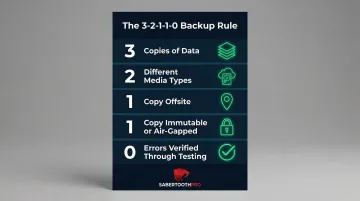
Together, these capabilities let organizations fail over to a clean, uncompromised environment without paying ransoms or risking reinfection. The current industry standard formalizes this approach as the 3-2-1-1-0 backup rule:
- 3 copies of data
- 2 different media types
- 1 copy offsite
- 1 copy immutable or air-gapped
- 0 errors, verified through automated testing
Geographic Redundancy and Multi-Region Availability
Cloud DR providers maintain recovery infrastructure in geographically separate regions — often hundreds or thousands of miles apart. This means a regional natural disaster, power grid failure, or localized cyberattack that takes down your primary site doesn't compromise your recovery environment.
With traditional DR, this kind of geographic separation either isn't an option (single-site setups) or costs more than most SMBs can justify (multi-site infrastructure). Cloud DR includes it by default — the same protection a large enterprise pays its facilities team to maintain is built into the subscription price.
How to Build a Cloud Disaster Recovery Plan: Step-by-Step
A cloud DR plan is a business continuity framework that aligns technology capabilities with your organization's survival requirements. Follow these five steps to build one that holds up when you actually need it.
Step 1: Conduct a Business Impact Analysis
The Business Impact Analysis (BIA) forms the foundation of your entire DR strategy. This structured assessment identifies:
- Critical systems and applications ranked by acceptable downtime (what must recover in under 1 hour vs. what can wait 24 hours)
- Dependencies between systems so recovery happens in the correct sequence
- Compliance requirements that dictate where and how data must be stored and recovered
- Financial impact of downtime for each workload, calculated by hour or minute
The BIA output directly sets your RTO and RPO targets. A financial trading platform might require RTO and RPO measured in seconds, while a standard business application might tolerate 4-24 hours. These targets determine which DRaaS delivery model and replication frequency you'll need—and therefore what you'll pay.
Step 2: Select the Right Provider and Delivery Model
Evaluate cloud DR providers against these key criteria:
- Geographic redundancy: Where are recovery sites located? Are they in separate regions?
- Automation capabilities: How much of failover and failback is automated vs. manual?
- Compliance certifications: Does the provider hold HIPAA, SOC 2, PCI-DSS, or CMMC certifications relevant to your industry?
- SLA transparency: Are RTO and RPO guarantees clearly documented with penalties for non-performance?
- Service model fit: Does self-service, assisted, or managed DRaaS align with your IT team's capabilities?
Organizations often benefit from working with a vendor-agnostic IT advisor that can benchmark multiple providers across a 300+ partner ecosystem. SabertoothPro's approach—leveraging real-world pricing data and certifications across HIPAA, SOC 2 Type II, PCI-DSS, and CMMC—helps SMBs navigate provider selection without bias toward any single vendor.
Step 3: Build and Document the Recovery Plan
A strong DR plan includes three essential components:
- Workload tiering segments systems into critical (Tier 1), important (Tier 2), and non-essential (Tier 3) categories, so revenue-generating or life-safety applications come online before less critical workloads
- Automated runbooks eliminate manual steps and human error during outages — scripts handle server startup sequences, network reconfiguration, database synchronization, and application health checks in the correct dependency order
- Defined roles and responsibilities ensure everyone knows their job when a disaster is declared: who authorizes failover, who communicates with stakeholders, who validates systems, and who coordinates with the DRaaS provider
Step 4: Test Regularly and Validate Targets
An untested DR plan provides no real protection. Test at three levels:
- Tabletop exercises: Team walkthroughs without touching production systems, validating that everyone understands their role
- Partial failover drills: Test a subset of non-critical workloads to validate technical processes without business risk
- Full failover simulations: End-to-end recovery tests that validate the entire plan meets RTO and RPO targets
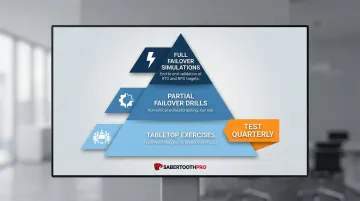
Test at minimum quarterly, and always after significant infrastructure changes. Cloud DRaaS platforms enable non-disruptive testing by spinning up isolated sandbox environments that don't impact production workloads, which eliminates the cost and risk that once made regular testing impractical.
Step 5: Maintain and Evolve the Plan
Cloud DR is not a one-time setup. As your business adds workloads, migrates to hybrid or multi-cloud environments, faces new compliance requirements, or experiences organizational changes, the DR plan must be updated.
Review and update:
- SLAs and provider agreements annually or when service offerings change
- Documentation and runbooks after every infrastructure change
- Contact lists and escalation procedures whenever team members change roles
- RTO and RPO targets when business criticality of systems shifts
When any of these trigger points hit and your plan hasn't been updated, you're effectively running on outdated assumptions — which is exactly when DR failures happen.
Frequently Asked Questions
What is disaster recovery as a service?
Disaster Recovery as a Service (DRaaS) is a cloud-based, third-party-managed solution that replicates an organization's IT infrastructure and data to a cloud environment. It enables rapid restoration of critical systems after disruptions, with recovery times governed by SLA-defined RTO and RPO targets.
What is the difference between BaaS and DRaaS?
BaaS (Backup as a Service) only backs up and restores data, typically requiring hours or days for recovery. DRaaS replicates the full IT stack—infrastructure, applications, and data—enabling recovery measured in minutes and providing operational continuity, not just data restoration.
What are the 4 C's of disaster recovery?
The 4 C's cover four pillars of an effective DR strategy:
- Continuity — keeping operations running during and after a disaster
- Coordination — clear roles defined between your team and provider
- Communication — internal and external notifications during incidents
- Completeness — all critical systems, dependencies, and data covered by the plan
What types of disasters does cloud disaster recovery protect against?
Cloud DR covers a wide range of disruption types:
- Ransomware and cyberattacks
- Hardware and power failures
- Natural disasters (floods, fires, storms)
- Human error and software corruption
Geographic redundancy and automated failover defend against both localized and large-scale events.
How often should you test your cloud disaster recovery plan?
Test at least quarterly using a mix of tabletop exercises, partial failover drills, and full failover simulations. Also test after any major infrastructure change to confirm the plan still aligns with your actual systems and can hit your RTO and RPO targets.
What is RTO and RPO in cloud disaster recovery?
RTO (Recovery Time Objective) is the maximum acceptable time to restore operations after disruption. RPO (Recovery Point Objective) is the maximum data loss the business can tolerate, measured in time between backups. These two metrics form the foundation of every cloud DR plan and must be defined before selecting a provider.