Introduction
A ransomware attack locks down your patient records at 9 AM. Your payment processing system crashes during peak sales hours. A server fire takes your primary data center offline. In each scenario, every hour of downtime costs your business revenue, customer trust, and compliance standing. The question isn't whether your business will face a disruption — it's whether your recovery plan executes in minutes or days.
93% of mid-sized and large enterprises estimate a single hour of downtime costs $300,000 or more, with 46% facing losses exceeding $1 million per hour. For SMBs, average downtime costs reach $8,000 per hour — yet 75% still operate without a formal recovery plan.
Disaster Recovery as a Service (DRaaS) solves the three core failures of traditional DR: high cost, operational complexity, and slow recovery. This guide covers how it works, the deployment models available, key recovery metrics, and what to look for in a provider.
TLDR:
- DRaaS replicates your IT environment to the cloud, enabling automated failover in minutes instead of days
- Replaces expensive secondary data centers with an OpEx subscription model, cutting infrastructure costs
- Protects against ransomware, hardware failures, natural disasters, and human error
- Required for regulated industries (healthcare, finance, legal) with HIPAA, PCI-DSS, SOC 2, or CMMC mandates
- Evaluate providers on geographic redundancy, SLA guarantees, certifications, and failover testing cadence
What Is DRaaS and How Does It Work?
Disaster Recovery as a Service (DRaaS) is a cloud-based managed service where a third-party provider replicates your company's IT infrastructure, applications, and data to geographically redundant cloud environments. When a disruption occurs—whether ransomware, hardware failure, or natural disaster—the provider activates your cloud-hosted replica so operations continue while your primary environment is restored. You don't maintain a secondary physical data center.
The financial case is clear: Gartner estimates network downtime costs $5,600 per minute—approximately $336,000 per hour. The global DRaaS market reached $18.89 billion in 2025 and is projected to grow to $83.15 billion by 2034, driven by escalating cyber threats and downtime costs.
How DRaaS Operates: Three-Phase Lifecycle
1. Continuous Replication and Monitoring
Your data, applications, and system configurations are continuously or periodically mirrored to the provider's cloud infrastructure. Modern DRaaS solutions use block-level replication or Continuous Data Protection (CDP) to capture changes in near-real-time—typically every few seconds to minutes—keeping potential data loss to an absolute minimum.
2. Failover
Once a disruption is detected, orchestration tools automatically shift operations from your primary infrastructure to the provider's cloud. The provider spins up virtual machines (VMs) from replicated data, allowing your business to resume operations. Depending on your Recovery Time Objective (RTO), failover can happen in minutes with minimal manual intervention.
3. Failback
Once your primary environment is restored, the provider synchronizes any changes made during failover and migrates workloads back to your original infrastructure. Replication resumes from that point forward, so the environment is protected against the next disruption from day one.
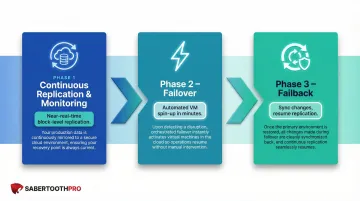
That three-phase process is designed to handle a wide range of failure scenarios—and the threat landscape it defends against is broader than most businesses expect.
What DRaaS Protects Against
- Ransomware and cyberattacks: In 2024, 59% of organizations were hit by ransomware, with mean recovery costs of $1.53 million excluding ransom payments
- Hardware failures: Server crashes, storage array failures, network equipment malfunctions
- Natural disasters: The U.S. sustained 403 billion-dollar weather and climate disasters from 1980 to 2024, totaling over $2.915 trillion in damages
- Human error: Accidental deletions, misconfigurations, or unintended data overwrites
- Power outages and facility failures: Grid failures, cooling system breakdowns, or data center incidents
Compliance and Regulatory Benefits
For businesses in regulated industries—healthcare, financial services, government contracting—DRaaS can be architected to meet specific framework requirements. Providers with built-in compliance capabilities handle much of the documentation work that auditors require, covering frameworks such as:
- HIPAA — Data availability and integrity controls for healthcare organizations
- PCI-DSS — Cardholder data protection and recovery documentation for financial services
- SOC 2 Type II — Continuous monitoring and audit trail requirements for SaaS and cloud environments
- CMMC — Controlled unclassified information (CUI) protection for government contractors
This matters because demonstrating business continuity during an audit is as important as actually having it.
DRaaS vs. Traditional Disaster Recovery
Traditional disaster recovery historically required businesses to maintain secondary "cold" or "warm" data centers—either owned or co-located—with dedicated infrastructure sitting largely idle. Recovery involved manual failover procedures that could take hours or days, and required significant capital investment in duplicate hardware, software licenses, and IT staffing.
Traditional DR Site Comparison
| Option | Infrastructure | Recovery Time | Cost Model | Downtime Risk |
|---|---|---|---|---|
| Cold Site | Power, cooling, and network only — no compute or storage pre-installed | 24+ hours (equipment procurement + setup) | Lowest CapEx | Highest |
| Warm Site | Hardware/software pre-installed; data synced daily or weekly | Hours to a full day; manual activation required | Medium CapEx | Moderate |
| Hot Site | Full mirror of production with real-time replication | Minutes | Highest CapEx (duplicate infrastructure) | Lowest |
| DRaaS | Cloud standby with automated orchestration and continuous replication | Minutes to hours | OpEx subscription | Low |
Four Critical Differences
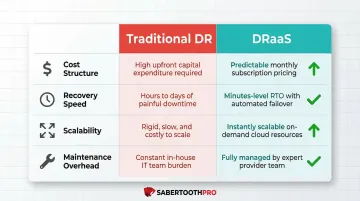
1. Cost Structure
Traditional DR requires expensive dedicated hardware sitting idle most of the time. DRaaS uses a cloud consumption model—you pay a monthly subscription based on protected data volume and workloads, shifting from capital expenditure (CapEx) to operational expenditure (OpEx). A Forrester study on cloud migration demonstrated a 90% reduction in server refreshes and purchases after moving workloads to the cloud.
2. Speed of Recovery
Traditional failover is manual and slow, often requiring IT staff to physically travel to the secondary site, activate systems, and restore data. DRaaS automates failover in minutes through pre-configured orchestration that spins up cloud resources automatically.
3. Scalability
Traditional DR doesn't scale easily—adding capacity means procuring new hardware and reconfiguring replication. DRaaS scales on demand through cloud resources, allowing businesses to protect additional workloads or adjust capacity without physical infrastructure changes.
4. Maintenance Overhead
Traditional DR requires in-house expertise to maintain secondary infrastructure, test failover procedures, and keep disaster recovery plans current. DRaaS transfers monitoring, testing, and recovery orchestration to the provider — freeing internal IT teams for higher-value work.
DRaaS vs. Backup-as-a-Service (BaaS)
Backup (including cloud backup) preserves copies of data — it does not replicate running infrastructure or orchestrate failover. With BaaS alone, a system failure means manually retrieving backups and rebuilding the entire environment from scratch, a process that can take hours or days.
DRaaS protects the entire IT environment by providing standby cloud infrastructure and automated orchestration. Operations continue running in the cloud during a disaster, dramatically reducing recovery time.
When to Choose DRaaS: When your Recovery Time Objective (RTO) is measured in minutes to hours rather than days. For most businesses, hourly downtime costs run into the thousands — making a DRaaS subscription a straightforward trade-off.
Key Benefits of DRaaS for Businesses
Dramatically Reduced Downtime and Faster Recovery
The automated failover capability of DRaaS can reduce recovery time from days to minutes. When average downtime costs reach $5,600 per minute ($336,000 per hour) across industries, every minute saved translates directly to preserved revenue, avoided regulatory penalties, and protected customer relationships. For brokerage firms, the stakes are even higher—estimated hourly downtime costs reach $6.48 million.
Lower Total Cost of Ownership
DRaaS fundamentally transforms cost structures by shifting DR investments from capital expenditures to operational expenditures. Businesses avoid upfront costs across several traditionally expensive DR components:
- Dedicated secondary hardware and software licenses
- Physical co-location or secondary facility costs
- Ongoing maintenance for idle standby infrastructure
Instead, they pay a predictable monthly subscription based on protected data volume and recovery targets.
Continuous Replication Minimizes Data Loss
Traditional backup cycles (daily or weekly) expose organizations to significant data loss. If your last backup was 24 hours ago and disaster strikes, you lose a full day of transactions, customer interactions, and operational data. Modern DRaaS solutions use Continuous Data Protection (CDP) and near-real-time block-level replication to capture changes constantly, allowing organizations to achieve Recovery Point Objectives (RPOs) measured in seconds or minutes instead of hours or days.
Simplified Compliance and Auditability
Many DRaaS solutions include built-in reporting, encryption at rest and in transit, and detailed audit trails that help businesses in regulated industries demonstrate compliance during audits. The HIPAA Security Rule requires organizations to review and test contingency and backup plans at least annually. Meeting that requirement is straightforward with DRaaS.
Modern DRaaS platforms support non-disruptive, isolated failover testing without touching production workloads—cutting the compliance burden on internal IT teams while satisfying requirements for data availability and emergency mode operations.
DRaaS Deployment Models: Managed, Assisted, and Self-Service
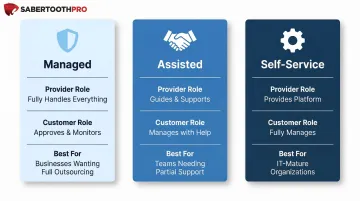
Not all DRaaS offerings are structured the same way. Providers offer three primary deployment models, each suited to different organizational capabilities and resource levels.
| Model | Provider Role | Customer Role | Best For |
|---|---|---|---|
| Managed | Handles all replication, failover, failback, and maintenance | Minimal involvement | SMBs without dedicated DR staff |
| Assisted | Provides infrastructure, tools, and expert support during events | Shared responsibility; customer manages day-to-day | Teams with some IT capability that want expert backup |
| Self-Service | Supplies cloud infrastructure and replication tools only | Full control over planning, testing, and execution | Enterprises with dedicated DR teams and complex requirements |
Managed DRaaS
Managed DRaaS holds the largest revenue share in the market, largely because it removes the operational burden from internal IT teams entirely. The provider monitors your environment around the clock, executes failover when a disaster occurs, and manages failback once your primary site is restored.
This model works well for SMBs that lack dedicated DR expertise or simply don't have the bandwidth to run recovery operations alongside normal IT responsibilities.
Assisted DRaaS
Assisted DRaaS splits responsibility between the provider and the customer. The provider delivers infrastructure, tooling, and expert guidance during recovery events, while the customer retains control over day-to-day operations and testing cadences.
This is a practical middle ground for organizations with some in-house IT capability that want access to expert support without handing over full control.
Self-Service DRaaS
Self-service gives your team complete ownership of DR planning, configuration, and execution. The provider supplies the cloud infrastructure and replication tools; your staff handles everything else.
It's the most cost-effective option, but only works if you have engineers who know DR architecture well. Organizations with complex or highly customized recovery requirements often gravitate here because they need precise control over RTO and RPO targets that a managed model may not accommodate out of the box.
RTO and RPO: The Metrics That Define Your Recovery
Two metrics determine the scope, cost, and architecture of any DRaaS solution: Recovery Time Objective (RTO) and Recovery Point Objective (RPO). Get these wrong, and you'll either overspend on protection you don't need or underinvest in systems you can't afford to lose.
Recovery Time Objective (RTO)
Definition: The maximum acceptable length of time a business can be offline after a disaster before the impact becomes unacceptable.
NIST SP 800-34 Rev.1 defines RTO as "the maximum amount of time that a system resource can remain unavailable before there is an unacceptable impact on other system resources, supported mission/business processes, and the Maximum Tolerable Downtime."
RTO drives infrastructure decisions. Lower RTOs require more sophisticated (and typically more expensive) DRaaS configurations to enable near-instant failover. A mission-critical e-commerce platform might require an RTO of 15 minutes, while internal reporting systems might tolerate 24-hour recovery windows.
Recovery Point Objective (RPO)
Definition: The maximum acceptable amount of data loss measured in time—how old can the most recent backup be when recovery begins.
NIST SP 800-34 Rev.1 defines RPO as "the point in time, prior to a disruption or system outage, to which mission/business process data can be recovered (given the most recent backup copy of the data) after an outage."
RPO drives replication frequency. A 15-minute RPO means data is replicated every 15 minutes, so no more than 15 minutes of data can be lost. A financial trading platform might require an RPO measured in seconds, while archival systems might accept 24-hour RPOs.
Setting RTO and RPO Targets by Workload Tier
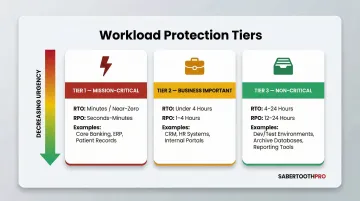
Not all workloads require the same protection level. A Business Impact Analysis (BIA) helps assign each application to the right tier — so near-zero RTO/RPO investment goes only where it's actually warranted.
| Tier | RTO Target | RPO Target | Recovery Strategy | Example Workloads |
|---|---|---|---|---|
| Tier 1: Mission-Critical | Minutes to near-zero | Seconds to minutes | CDP, instant failover, orchestrated DRaaS | EHR platforms, payment processing, trading systems |
| Tier 2: Business Important | Under 4 hours | 1 to 4 hours | Frequent incremental backups, warm site or standard DRaaS | CRM, internal communications, project management |
| Tier 3: Non-Critical | 4 to 24 hours | 12 to 24 hours | Daily snapshots, cold site, or BaaS | Archival data, internal reporting, historical analytics |
How to Choose the Right DRaaS Provider
Selecting the right DRaaS provider requires careful evaluation of technical capabilities, compliance certifications, contractual guarantees, and geographic redundancy.
Geographic Redundancy and Cloud Infrastructure
Confirm the provider hosts replicated workloads in geographically separate data centers—not just different availability zones within the same region. A single natural disaster or regional grid failure should not incapacitate both your primary and backup environments.
When evaluating infrastructure, ask:
- Whether data centers span truly separate geographic regions (not just separate zones)
- Whether the provider runs on major platforms (AWS, Azure, Google Cloud) or proprietary infrastructure
- What the failover path looks like if the provider's primary region goes offline
Major cloud platforms offer global reach, proven reliability, and established security controls. That said, vendor lock-in is a real consideration worth negotiating upfront.
Compliance Certifications and SLAs
Look for these certifications as baseline indicators:
- SOC 2 Type II: Confirms the provider has undergone independent audit of its security, availability, and data handling controls — not just a point-in-time snapshot
- ISO/IEC 27001: Demonstrates a formal, audited Information Security Management System is in place across the organization
Review Service Level Agreements (SLAs) for explicit RTO guarantees and infrastructure uptime commitments. For example, Microsoft Azure Site Recovery offers a financially backed 1-hour RTO SLA for protected instances. SLAs should clearly define conditions under which failover times are guaranteed and penalties (service credits) if targets are missed.
Testing Practices and Validation
The provider should support regular, non-disruptive DR testing so you can verify recovery actually works before a real disaster strikes. Industry standards including ISO 22301 require periodic exercising and testing of business continuity plans. Modern DRaaS platforms allow isolated failover testing without impacting production workloads.
Vendor-Agnostic Technology Advisory
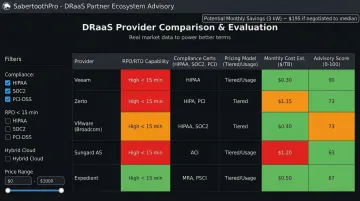
The DRaaS market includes dozens of providers with varying pricing models, compliance capabilities, and technical architectures. Evaluating them without independent guidance often leads to costly mismatches — paying for features you don't need or missing capabilities your compliance obligations require.
SabertoothPro's vendor-agnostic advisory model draws on a 300+ partner ecosystem to compare DRaaS options across multiple providers. The goal is matching the right solution to your industry, compliance requirements, and budget — without being steered by a single vendor's incentives. Real-world pricing data informs every negotiation, so you're not relying on a provider's published list rates.
Frequently Asked Questions
What is the difference between cloud backup and DRaaS?
Cloud backup preserves copies of data but does not replicate running infrastructure or automate failover. If systems fail, you must manually retrieve backups and rebuild the entire environment—a process that can take hours or days. DRaaS replicates the full IT environment and orchestrates automated recovery, cutting recovery time from hours to minutes.
How much does DRaaS typically cost?
DRaaS is priced on a subscription basis, with costs driven by the volume of data protected, number of workloads, and RTO/RPO targets. Pricing varies considerably by workload profile and provider, so request itemized quotes from at least two or three vendors before committing.
Is DRaaS suitable for small and mid-sized businesses?
Yes. DRaaS is particularly well-suited for SMBs because it eliminates the capital cost of building a secondary data center and offloads DR management to the provider. This gives small teams enterprise-grade resilience without requiring in-house DR expertise or large upfront investment.
How often should a DRaaS plan be tested?
Industry best practice calls for DR testing at least annually, though quarterly testing is recommended for mission-critical systems. The HIPAA Security Rule proposes organizations review and test contingency and backup plans at least once every 12 months. Most modern DRaaS platforms support non-disruptive testing that doesn't interrupt production operations.
What industries benefit most from DRaaS?
Industries with strict compliance requirements and high downtime costs benefit most: healthcare, financial services, legal, retail, manufacturing, and government contracting. The stakes are steep — healthcare organizations average $636,000 in downtime costs per hour, while brokerage firms face $6.48 million per hour.