Introduction
Starlink has genuinely changed connectivity for businesses in remote, rural, and multi-site environments. Sites that once relied on slow DSL or expensive LTE hotspots now stream video calls and run cloud applications without interruption.
But fast satellite internet isn't the same as a reliable business network. A July 2025 outage knocked tens of thousands of Starlink users offline for 2.5 hours, and a separate August 2025 global outage lasting nearly an hour disrupted U.S. Navy drone operations. For businesses where downtime means lost revenue or disrupted operations, a single connection introduces real risk.
That's exactly the gap a Peplink router addresses — turning Starlink from a fast-but-fragile pipe into a managed, resilient business network. What follows is a practical breakdown of what you actually get with the combination, and which scenarios justify the added investment.
Key Takeaways
- Starlink delivers high-speed satellite internet with broad coverage, but it's a single connection with no built-in redundancy and limited routing controls
- Peplink adds multi-WAN management, automatic failover, SpeedFusion bonding, load balancing, and QoS, making Starlink one layer in a fully resilient network
- Starlink alone works for low-stakes or personal use in areas with no other options
- Starlink + Peplink is the right choice for businesses with mission-critical uptime needs or operations across remote sites
- The combo costs more upfront but typically pays for itself the first time a major outage is avoided
Starlink Alone vs Starlink + Peplink: Quick Comparison
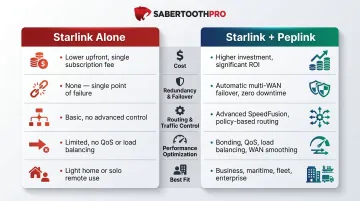
Both setups rely on Starlink for the satellite link — what differs is how that connection is managed, protected, and optimized.
| Consideration | Starlink Alone | Starlink + Peplink |
|---|---|---|
| Cost | Dish + monthly plan ($65–$540/mo); lower upfront | Peplink hardware ($499–$999+) plus optional SpeedFusion/PrimeCare; higher upfront |
| Redundancy & Failover | No failover — if Starlink drops, you're offline | Multi-WAN: LTE/5G or wired WAN takes over automatically |
| Routing & Traffic Control | Minimal — no QoS, no VLANs, limited configuration | Full SD-WAN: QoS, VLANs, traffic prioritization, outbound policy rules |
| Performance Optimization | Tied entirely to satellite signal quality | SpeedFusion bonding, WAN smoothing, and load balancing reduce packet loss and improve throughput |
| Best Fit | Residential users and low-traffic locations | Businesses, field teams, and remote operations where downtime isn't an option |
What Is Starlink, and Where Does It Fall Short?
Starlink is SpaceX's low earth orbit (LEO) satellite internet service. It delivers high-speed broadband to underserved and remote areas globally. Median peak-hour download speed in the US is approximately 200 Mbps with 25.7 ms latency—competitive speeds for video calls and cloud applications.
Core Appeal for Businesses
- Coverage in areas where fiber or cable doesn't reach
- Quick deployment with no trenching, permits, or ISP lead times
- Relatively simple hardware setup
The Single-Connection Problem
Starlink is a single-connection setup. When the satellite link drops, there is no backup path.
A July 2025 software failure knocked tens of thousands offline for 2.5 hours. An August 2025 global outage lasted nearly one hour and disrupted U.S. Navy drone operations. These incidents demonstrate that even well-funded military users experience Starlink's single-point-of-failure risk.
For a business running cloud-based POS, dispatch software, or patient data transmission, a 2.5-hour outage isn't an inconvenience—it's a revenue loss.
Weather and Obstruction Vulnerability
Heavy rain, snow, and even tree branches can interrupt signal. Starlink dishes are designed to automatically melt general snow accumulation, but extreme weather such as blizzards can outpace the melting function, causing temporary snow buildup and signal loss.
Construction sites, agricultural operations, and logistics fleets feel this most directly — the dish sits outdoors, fully exposed, with no fallback when weather hits.
The Router Control Gap
Starlink's built-in router offers minimal configuration—settings are managed exclusively through the Starlink mobile app, limited to WiFi name, password, and bypass mode toggle. For multi-user business environments, that means no way to:
- Prioritize VoIP calls over background file transfers
- Segment traffic across VLANs for security or compliance
- Apply QoS rules to protect latency-sensitive applications
Without traffic controls, a single surveillance feed or file upload can degrade a video call — and there's no native tool to prevent it.
Service Plan and Policy Risk
In March 2025, Starlink eliminated unlimited high-speed Priority data and replaced legacy plans with Local Priority and Global Priority. Once that priority data bucket runs out, speeds drop hard — throttled to 1 Mbps download and 500 Kbps upload.
Business account holders can no longer switch to consumer Roam plans without creating a new personal account and transferring hardware. For any operation where connectivity is revenue-critical, that throttle ceiling creates a real exposure — especially with no secondary path to absorb the gap.
What Does Peplink Add to Your Starlink Setup?
Peplink is a professional-grade SD-WAN and multi-WAN router platform built for environments where connectivity cannot fail. Peplink is a Starlink Authorized Technology Provider, offering firmware-level integration.
Peplink treats Starlink as one input among several, rather than the entire network. That distinction matters: instead of depending on a single satellite link, your network gains redundancy, traffic control, and failover logic that Starlink's native router simply doesn't provide.
SpeedFusion Bonding
SpeedFusion bonds multiple internet connections—Starlink + LTE/5G cellular + wired WAN—into a single managed tunnel. It operates in three modes:
- Failover: Switch to backup if Starlink drops
- Load balancing: Split traffic intelligently across connections
- Bonding: Combine all connections into one high-throughput pipe
Example: A remote construction site runs project management software and surveillance cameras. SpeedFusion bonds Starlink with a 5G cellular connection, providing higher total throughput and automatic failover if the satellite link drops.
WAN Smoothing
WAN Smoothing duplicates packets across two or more connections simultaneously. If Starlink stutters during a Zoom call or a VoIP session, the other connection carries the traffic seamlessly.
Real-time applications — VoIP, video conferencing, live POS transactions — have zero tolerance for even a 2–3 second gap. WAN Smoothing closes that window entirely.
Beyond packet-level reliability, Peplink gives IT teams direct control over how traffic moves across the network.
Traffic Management Capabilities
- QoS: Prioritize critical traffic (VoIP, ERP, point-of-sale) over bandwidth-heavy but non-critical traffic (software updates, streaming)
- VLAN support: Separate guest networks, IoT devices, and staff devices—a feature completely absent in Starlink's native router
- Outbound policy rules: Route traffic based on type, destination, or priority
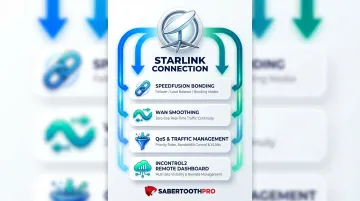
InControl2 and Remote Management
Peplink's InControl cloud dashboard gives IT teams and managed service providers real-time visibility into every device, WAN connection, and performance metric. Multi-site businesses no longer need an on-site technician to diagnose connectivity issues — problems surface in the dashboard before they escalate.
Firmware 8.4.0+ even supports Starlink antenna Stow/Unstow control directly from the InControl UI.
Starlink + Peplink vs Starlink Alone: Which Should You Choose?
Key Decision Factors
- Business criticality of uptime: How much does downtime cost your operation?
- Number of concurrent users: Single user vs. multi-user environment?
- Cellular coverage at location: Is LTE/5G available as a backup option?
- Budget for hardware and subscriptions: Upfront investment vs. cost of downtime
- Need for advanced network management: VLANs, QoS, traffic policies required?
When Starlink Alone Is Sufficient
- A sole proprietor working from a rural home office
- A vacation property or campground with light traffic needs
- A temporary personal setup where occasional outages are an inconvenience rather than a financial loss
When Starlink + Peplink Is the Right Choice
Starlink + Peplink is clearly the right choice for businesses where uptime translates directly to revenue or operational continuity:
- Trucking fleets needing persistent connectivity for dispatch and ERP systems
- Rural healthcare clinics where patient data transmission cannot drop
- Construction sites running project management software and surveillance cameras
- QSR franchises dependent on cloud-based POS and payment processing
- Remote agricultural operations managing IoT sensors and irrigation controls
The right Peplink model depends on your specific environment — and that's where the cost-benefit math becomes the deciding factor.
The Cost-Benefit Tradeoff
Peplink Hardware Entry Point:
Cost of Downtime:
- Gartner estimates IT downtime costs averaging $5,600 per minute (approximately $336,000 per hour)
- Ponemon Institute places the figure at approximately $9,000 per minute (approximately $540,000 per hour)
Even at 10% of the Gartner average ($33,600/hour), a 2.5-hour Starlink outage would cost an SMB approximately $84,000. That figure alone exceeds the one-time cost of a Peplink BR1 Pro 5G plus a full year of cellular backup service.
Real-World Example: Remote Site Connectivity With Peplink + Starlink
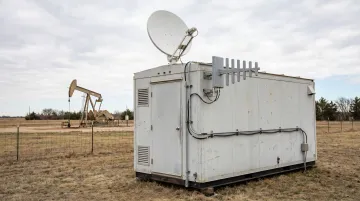
Metro Wireless deployed a Peplink + Starlink solution for an oil and gas client operating a remote manufacturing facility.
Deployment Details
- Client industry: Oil and gas—remote manufacturing facility with three trailers
- Peplink equipment: BR1 Pro 5G routers (one per trailer)
- Starlink equipment: Starlink Flat High Performance dishes
- Cellular backup: 5G SIMs with directional antennas pointed at towers approximately one mile away
- Network technology: SpeedFusion bonding combining Starlink and 5G
Verified Outcomes
- When a nationwide Starlink outage hit within the first month, the BR1 Pro 5G automatically rerouted all traffic to 5G cellular—zero downtime recorded.
- The client kept their /29 static IP block throughout the failover, keeping remote monitoring, security cameras, and SCADA systems fully operational.
- SpeedFusion bonding delivered higher combined throughput for bandwidth-intensive applications across all three trailers.
- InControl's InTouch feature lets Metro Wireless manage all network equipment remotely, with no technician dispatched to the field.
This setup translates directly to industries SabertoothPro serves: energy, construction, logistics, and manufacturing. If your remote sites can't rely on fiber, a bonded Starlink + cellular stack is how you keep them running.
Contact SabertoothPro at +1 888-891-2331 to talk through what this looks like for your specific sites.
Conclusion
Starlink alone works for low-stakes, single-user scenarios. For businesses where uptime translates directly to revenue, compliance, or operational continuity, adding Peplink isn't an upgrade—it's infrastructure.
The combination delivers:
- Reduced downtime across primary and failover connections
- Consistent performance for real-time applications like VoIP and video
- Traffic prioritization in multi-user environments
- Remote site management without dispatching technicians
If your operation can't absorb unplanned outages, that's the case for Peplink — not as a nice-to-have, but as part of the base infrastructure.
Frequently Asked Questions
What is Starlink Peplink?
"Starlink Peplink" refers to the combination of Starlink satellite internet (used as a WAN input) paired with a Peplink multi-WAN router that manages failover, bonding, and traffic control across multiple internet connections.
What is the Starlink 2 month rule?
Starlink allows users to pause service for up to two months. This is a billing consideration rather than a technical limitation. Businesses should account for this when evaluating service continuity.
How fast is Starlink $120 a month?
Starlink's standard residential plan (approximately $120/month) typically delivers 80–200 Mbps download and 15–35 Mbps upload. Actual speeds vary by location, plan type, and network congestion.
What's the best Starlink for a house?
Starlink's standard residential hardware (Gen 3 dish with WiFi 6 router) works well for most home users. Home-based businesses or remote workers needing reliability should pair the dish with a Peplink router and cellular backup rather than depending on the dish alone.
Does Starlink alone work for business use?
Starlink can handle basic business tasks like email, web browsing, and light cloud use. But it lacks the redundancy, traffic management, and failover capabilities that most multi-user or mission-critical business environments require.
What is SpeedFusion and why does it matter for Starlink users?
SpeedFusion is Peplink's bonding technology that combines Starlink with other WAN connections into a single optimized tunnel. It delivers zero-downtime failover and WAN smoothing, protecting real-time applications from satellite interruptions.