
Introduction
When businesses evaluate Starlink connectivity, two terms appear often: "public IP" and "static IP." Both sound like they solve the same problem, but on Starlink they describe different configurations with real consequences for reliability, security, and compliance.
The cost of mixing them up is real. Businesses upgrade to a Starlink Business plan expecting stable connectivity for VPNs, hosted servers, or VoIP — only to find their IP address still changes without warning.
A reboot during maintenance, a network event on Starlink's side, or a terminal relocation can break firewall rules, drop VPN tunnels, and interrupt SIP trunk registrations with no advance notice.
This article clarifies the three IP tiers on Starlink (CGNAT, dynamic public IP, and true static IP), what each enables, and how to decide which one your business actually needs.
Key Takeaways
- Starlink residential plans use Carrier-Grade NAT (CGNAT), meaning no true public IP is assigned to your connection
- Business plans unlock a dynamic public IP, but it can change on reboot or network events
- "Persistent IP" is Starlink's term for sticky dynamic addressing with no contractual guarantee of permanence
- True static IP requires a third-party overlay (SD-WAN, BGP tunnel) layered on Starlink
- VPNs, hosted services, and compliance operations require a true static IP, not just a public one
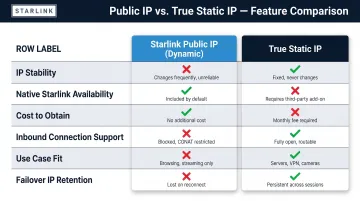
Starlink Public IP vs. Static IP: Quick Comparison
| Attribute | Starlink Public IP (Dynamic) | True Static IP |
|---|---|---|
| IP Stability | Usually persists, can change | Fixed, never changes |
| Native Starlink Availability | Yes (Business plans) | No — requires third-party overlay |
| Cost to Obtain | Included in Business plan ($140/month) | Requires SD-WAN service ($99–$300+/month) |
| Inbound Connection Support | Yes, while IP remains unchanged | Yes, permanent |
| Use Case Fit | Light business, outbound traffic | VPN, hosted services, compliance |
| Failover Retains Same IP | No | Yes (with SD-WAN overlay) |
What Is a Starlink Public IP?
CGNAT on Residential Plans
Starlink residential customers receive a private IP address from the 100.64.0.0/10 shared address space, a Carrier-Grade NAT (CGNAT) deployment. IETF RFC 6598 reserves this block specifically for ISP-to-CPE interfaces in CGN scenarios.
Your device sits behind two layers of NAT: your router's NAT, plus Starlink's carrier-grade NAT. That double-NAT blocks all inbound connections — you cannot host servers, terminate VPN tunnels, or accept remote desktop sessions.
Dynamic Public IP on Business Plans
Upgrading to a Starlink Business (Priority or Mobile Priority) plan removes CGNAT. You receive a globally routable IPv4 address via DHCP, making your network reachable from the internet. To enable this, navigate to Account > Subscriptions > IP Policy > "Public IP" in your Starlink dashboard, then reboot the terminal. Starlink's help center confirms that only Priority plans offer this option.
What "Persistent IP" Means
Starlink describes its public IP as "persistent" — it "will typically stay the same unless there is a change in the Starlink network or hardware." That wording matters: Starlink does not offer static IP addresses. The address is durable under normal conditions, but not guaranteed. Documented change triggers include:
- Factory reset of the terminal
- Changes in Starlink's network infrastructure
- Relocating the terminal to a different service address
Starlink's documentation recommends Dynamic DNS (DDNS) "if you require a consistent IP address for remote access" — an acknowledgment that the IP will eventually change.
Practical Limitations
That DDNS recommendation signals a real constraint: a dynamic public IP won't reliably support:
- Firewall allowlists (stale rules after IP changes)
- DNS A-records for hosted services (domain points to wrong IP)
- VPN configurations across sites (tunnel breaks until manually reconfigured)
Use Cases Where a Starlink Public IP Is Sufficient
Dynamic public IPs work well for:
- Individual remote workers using outbound-only cloud apps (Microsoft 365, Salesforce)
- Occasional VPN access that tolerates brief reconfiguration delays
- Small businesses with minimal inbound traffic needs
DDNS offsets some of that risk but adds management overhead and won't protect mission-critical systems from an unexpected change.
What Is a Static IP — and Does Starlink Offer One?
Defining a True Static IP
A static IP is a fixed, publicly routable IPv4 address (or block, such as /29 or /28) permanently assigned to a specific network endpoint. It never changes unless the organization requests it. The address is owned or leased by the organization or its provider — not subject to dynamic reassignment.
Starlink Does Not Offer Static IPs
Starlink's support documentation is explicit: "Starlink does not offer static IP addresses at this time." Even Business plans provide only a persistent (sticky) dynamic IP. The distinction matters: "persistent" signals best-effort retention, not contractual permanence.
How to Obtain a Static IP on Starlink
Businesses obtain true static IPs by deploying a **third-party SD-WAN device or VPN tunnel overlay** that routes a static IP block through Starlink's connection, regardless of what Starlink's own IP does underneath.
Example solutions:
- Bigleaf Networks: Issues an IP block independent of Starlink — your public IP stays the same even when traffic shifts between circuits.
- Cloudflare Zero Trust: Offers dedicated egress IPs as an Enterprise add-on, assigned exclusively to your account.
These overlays encapsulate your traffic through encrypted tunnels to a cloud gateway, where your static IP block is anchored.
Security and Compliance Implications
Industries subject to HIPAA, PCI-DSS, or SOC 2 need deterministic IP addresses for:
- Firewall audit logs that document allowed sources and destinations
- IP-based whitelisting for cardholder data environments (PCI-DSS Requirement 1.3.1)
- Inventoried, documented access points per SOC 2 CC6.1
Dynamic IPs make whitelisting unreliable and complicate audit documentation. That compliance gap translates directly into operational risk — here's where it shows up most.
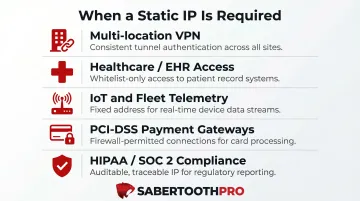
Use Cases Where a True Static IP Is Required
Common scenarios that require a static IP include:
- Site-to-site VPNs connecting multi-location retail or QSR franchises back to HQ
- On-premise servers, camera systems, or IoT devices that need to be reachable externally
- SIP trunks and VoIP/UCaaS platforms using IP-based authentication
- POS and payment processing environments requiring fixed firewall rules for PCI-DSS
- Healthcare and financial services with HIPAA or SOC 2 audit requirements
One often-overlooked benefit: with a static IP overlay in place, businesses keep the same IP block when Starlink fails over to LTE/5G backup. No firewall reconfiguration, no dropped sessions mid-outage.
Public IP vs. Static IP: Which Does Your Business Need?
Decision Framework
Evaluate based on three criteria:
- Do you host services that need to be reached from the internet?
- Do you use IP-based access controls (firewalls, VPN allowlists, compliance whitelists)?
- Is uptime and IP consistency during failover operationally critical?
When a Dynamic Public IP Is Sufficient
- Solo remote worker accessing cloud-hosted tools outbound (Slack, Zoom, Google Workspace)
- Small office with no hosted servers or VPN requirements
- Temporary job site using Starlink for internet browsing and SaaS apps
When a Static IP Is Non-Negotiable
- Multi-location retail/QSR: Consistent VPN tunnels between franchises and HQ
- Healthcare: HIPAA-regulated remote access to EHR systems
- Logistics/fleet: IoT telemetry reachable from central platform
- Financial services: PCI-DSS audit obligations for payment gateways
If your situation maps to any of the static IP scenarios above, the architecture decision matters as much as the IP type itself. SabertoothPro helps businesses across these sectors identify the right configuration — Starlink Business with an SD-WAN overlay, a multi-carrier bonded solution, or a hybrid setup — and implement it without being tied to a single provider's roadmap.
VoIP and SIP Trunk Considerations
SIP trunk providers typically offer two authentication modes: IP-based and credential-based. Telnyx's documentation states: "If you have a static IP address, then you can use an IP-based connection. If you do not have a static IP address, it will change and you will be unable to receive or make calls" when using IP-based authentication.
For Starlink Business users, the practical implications break down clearly:
- No static IP → credential-based SIP authentication is the only reliable option
- IP-based authentication → will fail when Starlink's assigned IP changes
- SD-WAN overlay with a static IP block → restores IP-based SIP trunking and enables firewall-level whitelisting
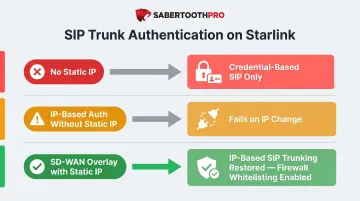
Without a fixed IP, your SIP trunk configuration is one network event away from dropping calls.
Conclusion
A Starlink public IP removes the CGNAT barrier and is adequate for outbound-heavy, low-criticality use cases. A true static IP is essential for any business that hosts services, enforces IP-based security policies, or needs consistent connectivity across failover events. That distinction has real operational and compliance consequences.
Because Starlink itself cannot provide a true static IP, businesses with those requirements need a solution layered on top — typically an SD-WAN overlay, managed VPN tunnel, or private APN from a carrier-certified provider. The architecture you choose determines whether Starlink becomes a reliable business-grade connection or a persistent liability when uptime and security are on the line.
Frequently Asked Questions
Does Starlink provide a static public IP?
No. Starlink does not offer true static IPs on any plan. Business plans include a dynamic public IP that usually persists but can change. Obtaining a true static IP requires a third-party overlay solution like SD-WAN.
What is the difference between a static IP and a public IP?
A public IP is any routable address reachable from the internet — it can be dynamic or static. A static IP is a public IP that never changes. Dynamic public IPs can break VPNs, firewall rules, and hosted services when they shift unexpectedly.
Why does a Starlink public IP address change?
Starlink assigns addresses dynamically via DHCP. A reboot, network maintenance, or satellite handoff event can trigger a new IP assignment. Starlink makes no guarantee the previous address will be reassigned.
What IP addressing scheme does Starlink use?
Starlink uses a three-tier structure: residential users get a CGNAT (shared) address from 100.64.0.0/10, Business plan users get a dynamic public IPv4 address, and IPv6 is assigned to all customers. None of these qualify as a true static IP allocation.
Is Starlink's persistent IP the same as a static IP?
No. "Persistent IP" is Starlink's term for a sticky dynamic IP that typically stays the same between sessions but carries no contractual permanence. Don't rely on it for business-critical configurations.
Can I run a business VPN reliably on Starlink's public IP?
A dynamic public IP can support VPN connections, but any IP change will break the tunnel and require manual reconfiguration. For reliable, always-on VPN connectivity, a static IP overlay is the practical solution — it keeps the tunnel stable regardless of what Starlink's address does.